Business Email Compromise: 9 Dangerous Warning Signs and How to React Fast
Table of Contents
Business email compromise is a BEC attack that uses trust, urgency, and social engineering to trick people into sending money or sensitive information. If you know the business email compromise warning signs, you can pause the request before one rushed click becomes a costly scam.
I have seen how ordinary a risky message can look when it lands in a busy inbox. It may not have a strange attachment or a loud phishing warning. It can look like a normal email thread from a director, supplier, solicitor, or finance contact.
The short explanation
Business email compromise is an email scam where an attacker impersonates a trusted person or company to steal money, login access, payroll data, invoices, or other sensitive information.
The clearest warning signs are urgent payment requests, changed bank details, odd sender email addresses, unusual secrecy, altered email thread wording, and pressure to skip normal checks. React by stopping the transaction, verifying the request through a separate channel, securing the email account, preserving evidence, and reporting the incident fast.
What Is Business Email Compromise?
Business email compromise, also called BEC, is a targeted email threat built around impersonation. The attacker may pretend to be your CEO, a senior manager, a supplier, a lawyer, a colleague in HR, or a client who already works with you.
The danger is that a BEC scam can look calm, polite, and routine. It does not always feel like a malicious attack. Many messages contain no attachment, no malware link, and no obvious spelling mistake.
Attackers use open company information, LinkedIn posts, invoice patterns, staff names, and supplier relationships to make the request feel real. A BEC email might ask for a wire transfer, payroll change, invoice update, tax document, gift card purchase, or confidential file.
This is why email security must cover more than spam filtering. Your team also needs clear payment rules, security awareness training, and a culture where people can question unusual requests without feeling awkward.
That culture matters because BEC attackers do not need to beat every control. They need one tired person to believe a message at the wrong moment. Make verification feel like a normal part of work, not an accusation or a delay.
Why BEC Attacks Hurt Businesses So Much
A successful BEC attack hits the business where trust is highest. It exploits the fact that finance teams, founders, operations staff, and suppliers need to move quickly.
The FBI has called BEC one of the costliest forms of cybercrime. Its public IC3 reporting shows that reported cybercrime losses reached billions of dollars each year, with business email compromise remaining a major fraud category. You can review the latest FBI figures in the FBI Internet Crime Report announcement.
The money is not the only loss. A business may also face supplier disputes, payroll disruption, client data exposure, insurance questions, legal costs, and a long internal review.
Small businesses can be hit as hard as larger firms. A single fake invoice or account change can drain cash, delay wages, or damage client trust.
9 Warning Signs of a BEC Attack
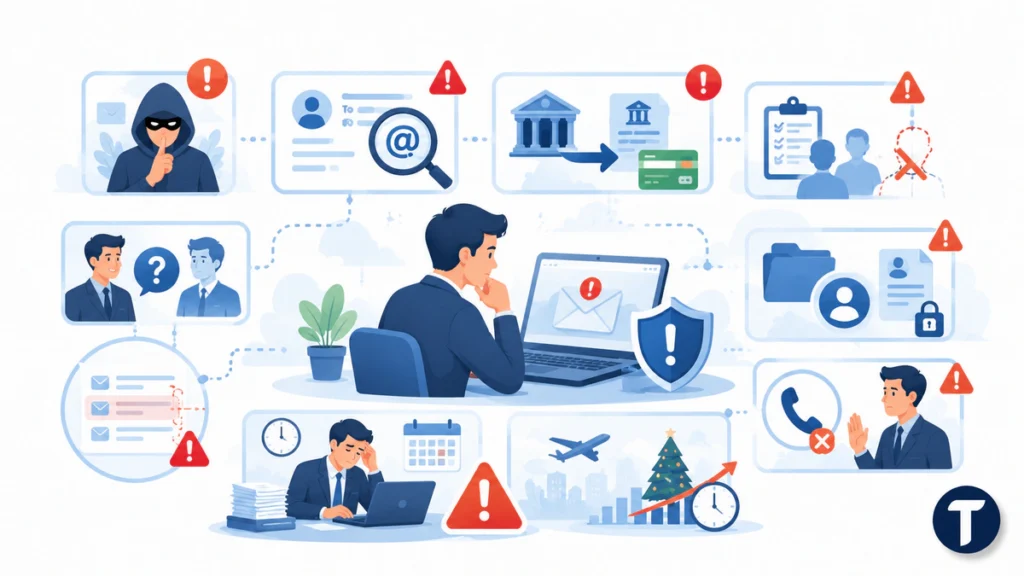
Some identifiers of a BEC attack are technical. Others are behavioral. The strongest protection comes from noticing patterns before the request is completed.
1. The Request Is Urgent and Secret
A scammer often adds pressure. The message may say the payment is confidential, the CEO is travelling, the supplier is angry, or the deal will collapse today.
Urgency plus secrecy is one of the clearest warning signs. Real work can be urgent, but it should not require people to bypass controls.
Slow down if an email asks you to keep the request quiet, avoid calling someone, or move money outside the normal approval route.
2. The Sender Address Looks Slightly Wrong
Check email addresses with care. A fake domain may swap one letter, add a hyphen, use a different ending, or place a real name before a false domain.
A message can also come from a real, compromised email account. That makes the sender look legitimate, but the tone, request, or timing may still feel wrong.
Do not trust the display name alone. Open the full address before you act.
3. Bank Details or Payment Instructions Change
Invoice redirection is a common BEC scam. The attacker enters an existing supplier conversation and says the bank account has changed.
Treat every payment detail change as high risk. Use a known phone number from your records, not the number in the email, to verify the change.
A simple call-back rule can stop a wire transfer before it leaves the business.
4. The Message Pushes You Outside the Normal Process
Many business email compromise attacks succeed because someone is asked to make an exception. The request might skip purchase orders, ignore two-person approval, or ask for a same-day payment before paperwork catches up.
Strong processes protect helpful people from being manipulated. If the message asks you to break policy, treat that as a security signal.
5. The Tone Feels Off for the Person
A BEC attack may copy a name and signature, but it rarely captures every habit. The email may sound colder, more formal, shorter, or more forceful than usual.
Watch for odd greetings, unusual punctuation, missing context, or a sudden switch from friendly chat to payment pressure.
Tone alone does not prove fraud. It is a reason to verify.
6. The Email Thread Has Strange Gaps
Attackers sometimes reply inside a stolen or forwarded email thread. That gives the message instant credibility because the earlier conversation looks real.
Look for missing attachments, changed subject lines, replies at strange times, or wording that does not match the earlier discussion.
A familiar thread can still carry a malicious request. Treat the new instruction, not the old conversation, as the risk.
7. The Request Targets Payroll or Employee Data
BEC is not only about supplier invoices. HR teams may receive messages asking for tax forms, direct deposit changes, employee files, or payroll updates.
Sensitive information can fuel identity fraud, account takeover, and further phishing attacks. Confirm employee data requests through your HR system or a verified internal channel.
8. The Email Avoids Voice Verification
A legitimate requester should accept a quick call for a high-risk action. A scammer may claim they are in a meeting, on a flight, at a conference, or unable to speak.
This does not mean every unavailable sender is fake. It means the transaction should wait until verification is complete.
A five-minute delay is better than a five-figure loss.
9. The Message Appears During a Busy or Emotional Moment
BEC attackers time requests around holidays, executive travel, acquisitions, tax season, vendor renewals, and end-of-month finance pressure.
They want the recipient to feel rushed, tired, helpful, or afraid of blocking important work. Teach teams to spot the pressure pattern, not just the technical clue.
Common Types of BEC Scams
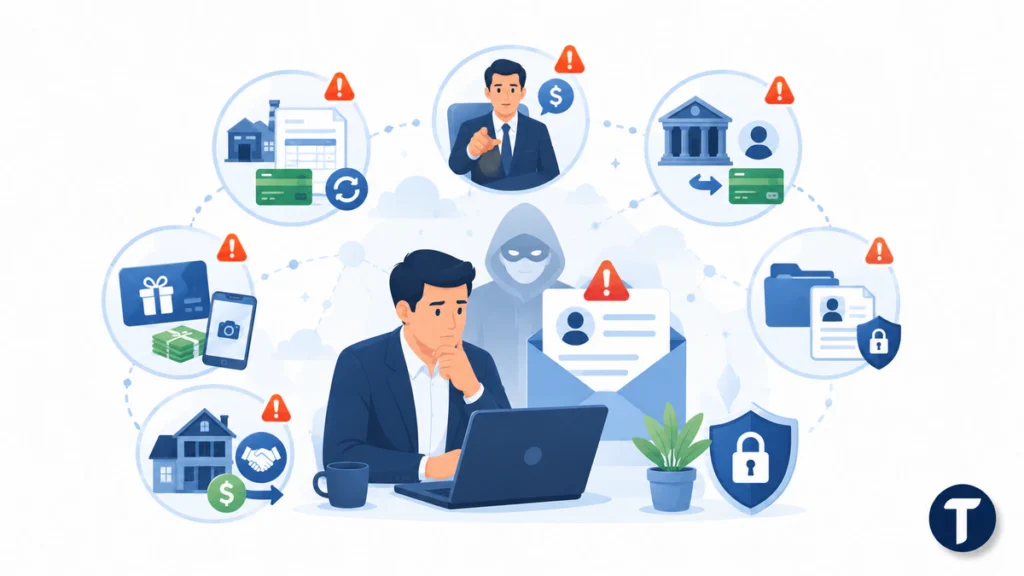
A good response plan starts with knowing what attackers are trying to achieve. Common BEC schemes include:
- CEO fraud, where an executive appears to ask for an urgent transfer.
- Supplier invoice fraud, where payment details are replaced.
- Payroll diversion, where an employee’s direct deposit details are changed.
- Gift card scams, where staff are pushed to buy codes and send photos.
- Legal or property payment fraud, where a closing payment is redirected.
- Data theft occurs when HR or finance is asked to send sensitive information.
The pattern is always the same: trusted identity, believable timing, and pressure to act.
How to React When You Suspect BEC
Do not reply to the suspicious email. Do not use any phone number, link, or contact detail inside it. Move to a clean verification path.
Follow this response sequence:
- Stop the payment, payroll change, file transfer, or account update.
- Verify the request through a known phone number, internal chat, or trusted supplier contact.
- Alert finance, IT, security, and the person being impersonated.
- Preserve the email, headers, attachments, screenshots, and timeline.
- Reset passwords and revoke sessions if an email account may be compromised.
- Check mailbox rules, forwarding settings, and recent logins.
- Contact your bank at once if money has moved.
- Report the incident to the relevant cybercrime or law enforcement channel.
- Review the process gap that made the attempt possible.
Speed matters most when funds have left the account. Banks and investigators have a better chance when they receive details early.
How to Detect BEC Before Money Moves
You can detect BEC by combining people, process, and technology. None of these layers is enough alone.
Start with payment controls. Require two-person approval for new beneficiaries, bank detail changes, urgent transfers, and high-value payments. Keep supplier contact details in a system of record.
Add email authentication. SPF, DKIM, and DMARC make spoofing harder and support better domain protection. These controls do not stop every compromised account, but they reduce easy impersonation.
DMARC is worth understanding properly rather than switching on blind. RFC 7489, the DMARC specification, describes how a domain owner publishes a handling policy for messages that fail authentication and receives reports on those failures, which is what turns it from a checkbox into a monitoring control.
Train staff with examples from real workflows. Security awareness training works best when it uses invoices, payroll messages, executive requests, and vendor emails that look like what your team handles every week.
Use secure email tools to inspect email traffic, sender reputation, domain lookalikes, anomalous wording, and suspicious reply-chain behavior. Resources from vendors such as Mimecast can be useful when you want a plain-language example of how BEC protection fits into a wider email defense plan.
TechBonna has also covered practical email security upgrades that reduce everyday mistakes around phishing, passwords, spoofing, and mailbox risk.
What to Check After a BEC Attempt
A blocked attempt still deserves a review. It may show that your business was researched, a supplier was compromised, or an inbox is already being watched.
Check these areas after the first response:
- Mailbox forwarding rules and hidden filters.
- Recent sign-ins from unknown locations or devices.
- OAuth app permissions and connected services.
- Supplier bank detail change records.
- Finance approval logs and exceptions.
- Similar messages sent to other staff.
- Domain lookalikes registered near your brand.
- Accounts with weak passwords or missing multi-factor authentication.
Treat a failed BEC campaign as useful intelligence. It tells you what the attacker knows, who they targeted, and which workflow needs stronger controls.
How to Prevent Business Email Compromise
Preventing BEC is not about buying one tool and declaring the problem solved. It is about making fraud harder at every step.
Build a simple prevention checklist:
- Use multi-factor authentication for all email and admin accounts.
- Require call-back verification for payment changes.
- Keep supplier records separate from email instructions.
- Enforce two-person approval for high-risk transactions.
- Use email authentication on company domains.
- Train staff to challenge unusual requests.
- Monitor email account rules and sign-in activity.
- Limit who can approve payments, payroll changes, and sensitive data releases.
- Test your response plan before a real incident.
The best defenses against BEC are boring in the right way. They make it normal to pause, verify, and document the request before money or data moves.
Review the checklist with finance, HR, sales operations, and anyone who can change supplier or payroll records. A policy hidden in a folder will not stop a rushed payment request. A short monthly reminder, a visible call-back rule, and a shared incident contact will protect your organization far better than a process nobody remembers.
What this means in practice
Business email compromise is dangerous because it turns normal trust into a route for fraud. A BEC attack does not need malware to work, so teams must learn the business email compromise warning signs and react before urgency overrides process. Keep verification simple, make exceptions rare, and treat every unusual money or data request as a moment to pause before you act.