Ethernet Cable Color Order: A Simple Guide for Building Reliable Networks
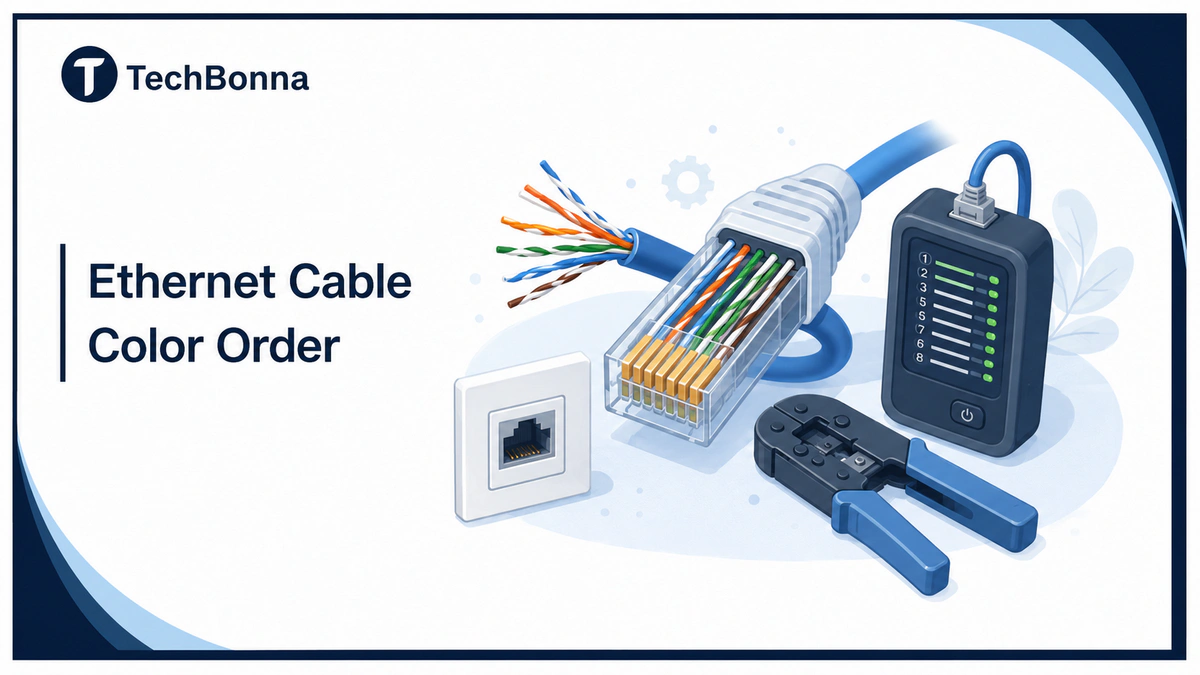
Ethernet cable color order tells you where each internal wire goes in a modular network plug. Follow the right color code and the lead can carry data cleanly; guess the order and it may connect slowly, fail, or create hard-to-find faults.
This guide explains Ethernet cable color order, network cable testing, and Power over Ethernet safety for home, office, and small data center work. It keeps the language simple while staying precise about T568A, T568B, crossover use, tools, and safe installation.
Quick Answer
Ethernet cable color order is the eight-pin wiring sequence used in a modular Ethernet plug. Use either T568A on both ends or T568B on both ends for a straight-through lead. T568B is common for patch leads, T568A is also a recognized wiring standard, and both work when the color code is followed correctly. Do not mix T568A and T568B unless you intentionally need an Ethernet crossover cable. Always test the finished lead before using it.
Color Code Basics
Ethernet cable color order is about internal conductors, not the outside jacket. A blue, gray, green, yellow, or purple cable can all use the same Ethernet cable color code. Jacket color helps cable identification, but it does not decide speed, category, or compatibility.
The internal Ethernet cable color code controls the arrangement of wires, not the color of an Ethernet cable jacket. Different cable colors can support the same data transmission if the internal twisted wires follow the right wiring sequences. For network setup, use jacket color only as a cable identification aid.
Color standards are useful for network administrators because they reduce mistakes in a data center, office closet, or home lab. The Telecommunications Industry Association is the standards body commonly associated with structured cabling guidance, while the Institute of Electrical and Electronics Engineers, often referenced with the American National Standards Institute, defines many IEEE rules for how data signals operate over compatible media. In practical terms, colors can vary outside the jacket because cable manufacturing and site policy are separate from the internal pinout.
Which Standard Should You Use?
Use the standard already present in the building. If a patch panel, wall jack, or old lead uses T568A, keep using T568A. If the site uses T568B, keep using T568B. Match the existing Ethernet cable color order before adding a new run. A related TechBonna guide shows what an Ethernet cable looks like if you are still identifying plugs, jackets, and connectors.
For a new standalone patch lead, T568B is a common default wiring choice. The important rule is not that T568B is faster. The important rule is that the same Ethernet cable color order must appear at both ends of a straight-through Ethernet lead.
T568B RJ45 Color Code Diagram
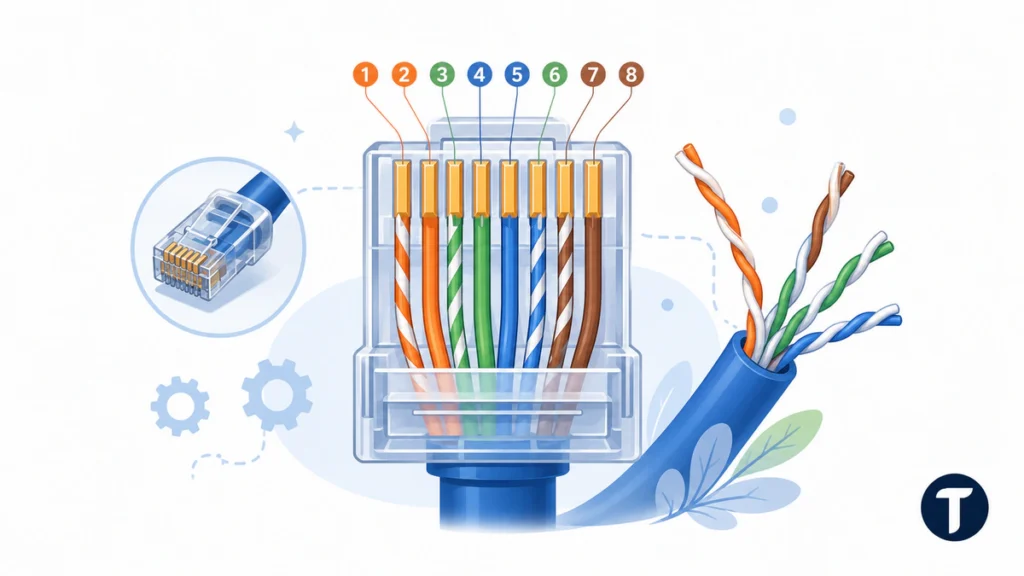
Use this front-view RJ45 color code with the gold contacts facing you and the locking clip facing away. Read pin one to pin eight from left to right. This is the T568B Ethernet cable color order:
| Pin | T568B Wire | Pair |
|---|---|---|
| 1 | White/Orange | Pair 2 |
| 2 | Orange | Pair 2 |
| 3 | White/Green | Pair 3 |
| 4 | Blue | Pair 1 |
| 5 | White/Blue | Pair 1 |
| 6 | Green | Pair 3 |
| 7 | White/Brown | Pair 4 |
| 8 | Brown | Pair 4 |
T568B wiring places the orange pair on pins one and two. The green and orange pairs still stay together as pairs, which matters more than memorizing a cable color chart without understanding the pair layout.
T568A RJ45 Color Code Diagram
T568A and T568B standards mainly swap the green and orange positions. Blue and brown stay in the same places. This is the T568A Ethernet cable color order:
Fluke Networks’ T568A and T568B comparison confirms that both patterns are permitted under ANSI/TIA-568.2-D and have the same transmission performance, with the green and orange pairs changing positions. This makes consistency, not an assumed speed advantage, the key choice.
| Pin | T568A Wire | Pair |
|---|---|---|
| 1 | White/Green | Pair 3 |
| 2 | Green | Pair 3 |
| 3 | White/Orange | Pair 2 |
| 4 | Blue | Pair 1 |
| 5 | White/Blue | Pair 1 |
| 6 | Orange | Pair 2 |
| 7 | White/Brown | Pair 4 |
| 8 | Brown | Pair 4 |
T568A is often used where structured cabling or an existing telecommunications installation already follows that pattern. Match what is there, label it, and document the Ethernet cable color order for future work.
Cat5e, Cat6, and Cat6a Cable Color
Cat5e, Cat6, and Cat6a cable normally use the same T568A or T568B cable wiring color code. The category rating describes performance, construction, shielding options, and supported network setup, not a different internal wiring color.
A Cat6 cable can fail if the conductors are arranged badly. A Cat5e lead can work well when it is terminated cleanly. Choose the right category, then apply the same Ethernet cable color order and test the installation.
Tools for Reliable Installation
A good termination needs more than the right cable color code. Use a stripper that does not nick copper, modular plugs that match solid or stranded conductors, a suitable crimp tool, and a tester. For permanent work, use proper jacks or a patch panel rather than forcing a field-made plug where a fixed outlet belongs.
- Cat5e, Cat6, or Cat6a cable suited to the run
- Modular plugs or keystone jacks that match the conductor type
- Stripper, snips, and a crimp tool made for the plug style
- Continuity tester for simple patch leads
- Qualification or certification tester for business installation
- Labels for both ends of every run
For professional jobs, Fluke Networks explains cable certification testing as a way to check performance issues beyond simple continuity. That is why stronger network cable testing is needed for installed cabling, VoIP phones, access points, and business network infrastructure.
Step-by-Step Termination
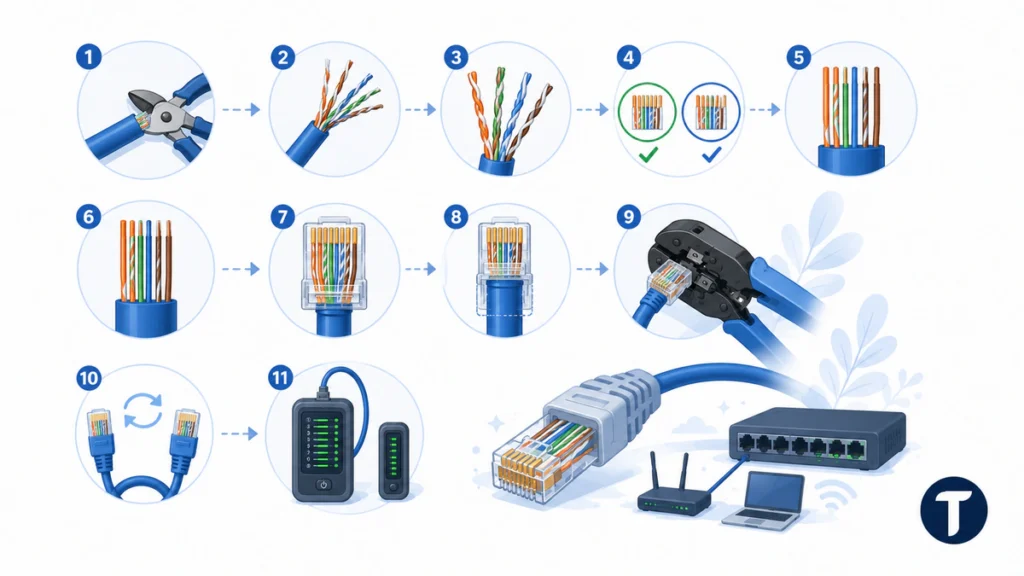
- Cut the lead squarely.
- Strip only enough jacket to arrange the individual wires.
- Keep each twisted pair close to the plug.
- Choose T568A or T568B before trimming.
- Arrange the wires in the specific order shown in the diagram.
- Trim the ends evenly.
- Push every conductor fully to the front of the plug.
- Seat the jacket under the strain relief.
- Crimp firmly with the correct tool.
- Repeat the same Ethernet cable color order on the other end.
- Run network cable testing before connecting important devices.
If the order is wrong, cut the plug off and start again. Do not try to reuse a crimped plug. A fresh connector costs less than troubleshooting an intermittent connection later, and a verified Ethernet cable color order is easier to trust.
Straight-Through Ethernet vs. Crossover Cable
Straight-through Ethernet uses the same standard on both ends. That is what most routers, switches, computers, printers, cameras, and access points need. A crossover cable uses T568A on one end and T568B on the other.
Older direct device-to-device links sometimes needed crossover connections. Modern equipment usually handles this automatically, so an Ethernet crossover cable is now a special case. If you did not deliberately plan a crossover, keep the Ethernet cable color order identical at both ends.
Safety Notes and PoE Checks
Power over Ethernet safety matters because PoE sends power to devices through the same conductors used for data. Poor terminations can create heat, voltage drop, or unstable cameras, phones, and access points. Keep all pairs intact, use suitable cable, and avoid damaged plugs.
Do not run low-voltage network wiring in unsafe spaces, inside mains conduit, or through fire-rated areas without the correct rating and local-code knowledge. For ceiling spaces, rental properties, long in-wall runs, and business sites, hire a qualified installer if you are unsure.
Network Cable Testing Checklist
Network cable testing should happen before the lead is trusted. A basic tester can find opens, shorts, reversals, and crossed pins. A certification tester can check length, crosstalk, return loss, and other limits that affect reliable Ethernet networks.
- Inspect both ends in the same orientation.
- Check pins one through eight with a tester.
- Confirm no open, shorted, reversed, or crossed wires appear.
- Connect to a known-good switch and device.
- Check the negotiated link speed.
- Run a file-transfer or speed test.
- Move both ends gently to catch intermittent contact.
- Label the run after it passes network cable testing.
Frequently Asked Questions
Does External Cable Color Matter?
External cable color only matters if your team uses color schemes for cable identification. Blue Ethernet, yellow Ethernet, green Ethernet, and gray Ethernet can all work the same if the internal Ethernet cable color order is correct.
Is T568A or T568B Better?
Neither is automatically better. T568B is common for patch leads, while T568A appears in structured cabling. Follow the existing industry standard at the site and keep both ends consistent.
Can Wrong Wiring Slow Down Internet Speed?
Yes. Bad wiring can cause lower link speed, packet loss, or no connection. A lead that should run at Gigabit Ethernet may fall back to 100 Mbps if one pair is not connected correctly.
Do I Need All Eight Wires?
Yes for normal modern Gigabit Ethernet. Some older Fast Ethernet links used two pairs, but reliable ethernet cabling should terminate all four pairs cleanly and keep the same Ethernet cable color order throughout.
Should I Use a Standard Color or Custom Color Schemes?
Use the standard color code for the individual wires within the cable. Custom color schemes should only apply to the outside jacket, such as using one jacket color for VoIP phones and another for cameras or guest network connections.
Final Thoughts
Ethernet cable color order is the foundation of a reliable wired link, but the full job includes clean termination, safe routing, careful labeling, network cable testing, and Power over Ethernet safety. Choose T568A or T568B, keep the same color code on both ends, test the lead, and document the result before adding it to a live network.