SOC Case Management: 7 Powerful Ways to Transform Incident Response
Table of Contents
SOC case management turns incident response inside a security operations center into a clear, trackable workflow instead of a rush of disconnected alerts.
It gives each analyst the context, owners, evidence, automation, and audit trail needed to move from detection to recovery with less delay.
The quick version
SOC case management transforms incident response by turning scattered alerts into assigned, documented, and measurable cases.
It helps security operations centers improve response in seven powerful ways: centralizing alert context, creating repeatable workflows, speeding up triage, assigning clear ownership, connecting automation and SOAR actions, improving cross-team collaboration, and turning each incident into better reporting and lessons learned.
Instead of forcing analysts to rebuild the story from SIEM alerts, endpoint logs, user reports, email security tools, and chat messages, SOC case management gives the team one shared place to investigate, contain, recover, and close incidents with evidence.
Why SOC Case Management Matters for Incident Response
A modern SOC rarely fails because analysts do not care. It fails because too much work lands in too many places at once.
One alert may start in a SIEM. Another may arrive from endpoint detection. A third may come from a user report, a malware sandbox, or threat intelligence feeds. Without case management, the security team has to rebuild the story by hand.
Effective SOC case management gives the team one place to see what happened, who owns the case, what evidence exists, and what response actions are still open.
NIST incident response guidance says organizations should improve preparation, detection, response, and recovery as part of cybersecurity risk management. SOC case management supports that goal because it turns incident handling into a repeatable process.
I think of it as the incident response notebook your whole team can use at the same time. It keeps the facts, decisions, and next steps together.
7 Powerful Ways SOC Case Management Transforms Incident Response
The value of SOC case management is not just better organization. It changes how the SOC works during real incidents.
Here are seven ways it improves incident response:
- Centralizes alert context. Analysts can view alerts, affected users, assets, indicators, evidence, and notes in one case record.
- Creates a repeatable workflow. Every case can move through intake, triage, investigation, containment, recovery, and review.
- Speeds up triage. Related alerts, asset data, threat intelligence, and previous decisions help analysts prioritize faster.
- Assigns clear ownership. Each case has a responsible analyst, open tasks, and visible handoffs.
- Connects automation and SOAR actions. Repetitive enrichment and low-risk actions can run from playbooks while staying tied to the case.
- Improves collaboration. Security, IT, cloud, legal, compliance, HR, and business owners can work from the same facts.
- Strengthens reporting and lessons learned. The case record becomes a source for audit notes, metrics, root cause analysis, and process improvement.
These seven benefits are strongest when the case record becomes the live workspace for incident response, not just a place to store notes after the work is done.
What a SOC Case Management Workflow Should Include
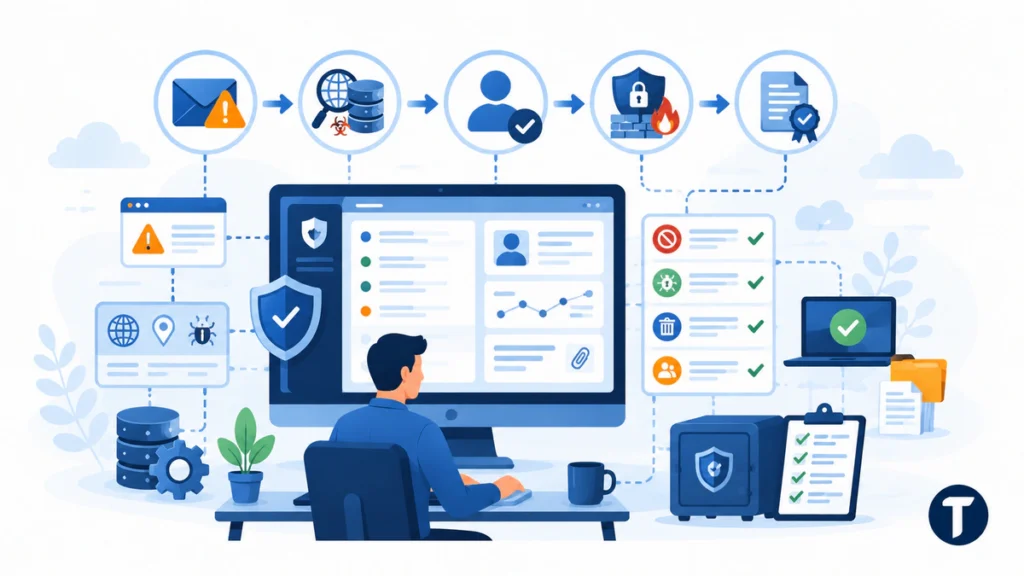
SOC case management works best when it follows the way analysts already investigate security incidents. It should not add another admin burden.
A strong workflow moves every case through intake, triage, investigation, containment, recovery, and review.
If you are defining that workflow from scratch, the FIRST CSIRT Services Framework is a practical reference point. It breaks incident response into named service areas and functions, which makes it easier to see which parts of the job your case template is quietly leaving out.
At a minimum, a SOC case management system should cover these steps:
- Capture the alert. Pull in the source, time, asset, user, severity, and first log evidence.
- Enrich the case. Add threat intelligence, asset data, malware details, identity context, and related security events.
- Assign ownership. Give one analyst clear responsibility while keeping managers and other responders informed.
- Track response actions. Record containment, eradication, recovery, and communication tasks.
- Close with evidence. Store the incident report, root cause, lessons learned, and audit notes.
This approach gives the SOC a shared incident record instead of scattered chat messages, spreadsheets, and ticket comments. It also makes compliance easier because the audit trail is created as the work happens.
For example, a phishing case may begin with an email security alert. The case record can enrich the sender domain, check the attachment hash, identify affected users, assign an analyst, remove matching emails from inboxes, reset credentials if needed, document the evidence, and close with lessons learned.
That is the difference between simply receiving an alert and managing an incident.
How Case Management Tools Streamline Alert Triage
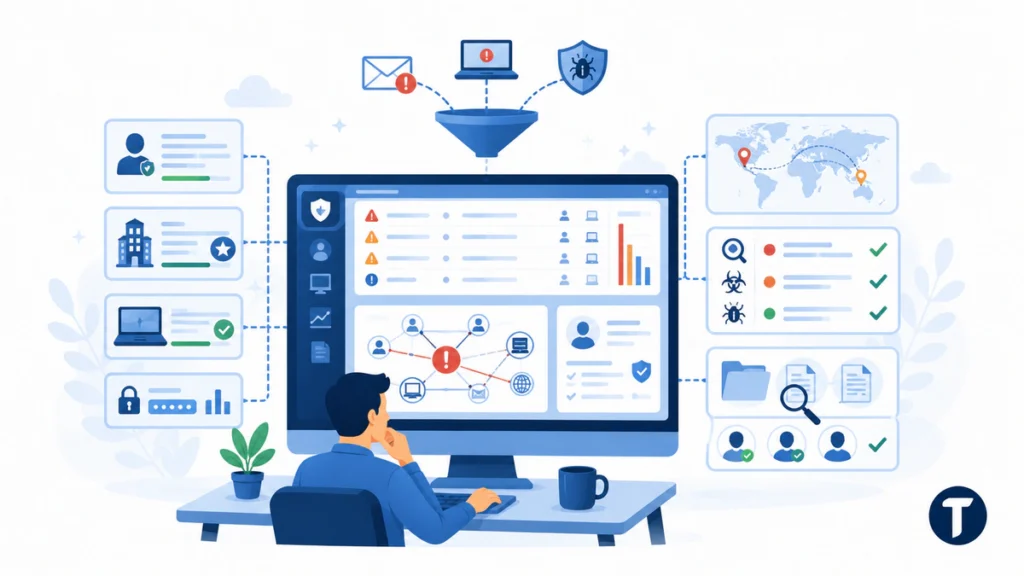
Triage is where many teams lose time. Analysts have to decide whether an alert is noise, a real security threat, or part of a larger attack.
Case management tools streamline triage by connecting alert details, context, and priority in one platform.
The best tools centralize related alerts, correlate them with user and asset data, and show whether the same indicator appeared in other cases. When analysts need packet-level proof, packet capture can show the network traffic behind a suspicious alert before the team decides on containment.
For example, a phishing alert may look small on its own. A good case view may show the same sender, attachment hash, and URL across 12 inboxes. That changes the priority fast.
Security case management also reduces duplicate effort. If one analyst has already checked an indicator, others can see the notes, evidence, and decision. The team does not repeat the same work.
Useful triage context may include:
- User identity and privilege level.
- Asset criticality and business owner.
- Endpoint detection results.
- Recent authentication activity.
- Threat intelligence matches.
- Related alerts from the same user, host, IP address, domain, URL, or file hash.
- Previous cases involving the same indicator.
When this information is visible in the case, analysts can make better decisions faster.
Where Automation and SOAR Fit in Case Management
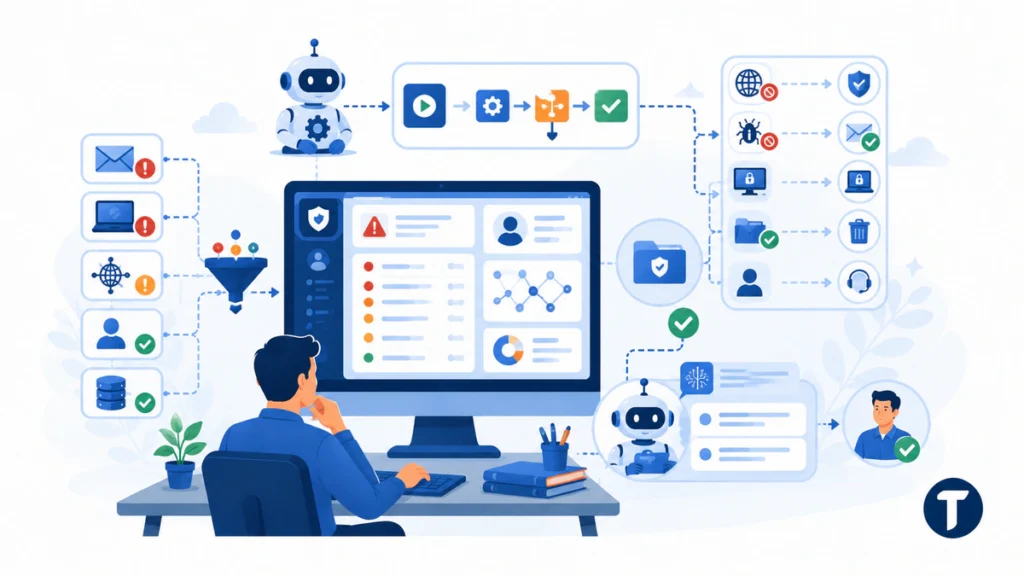
Automation should remove busywork, not hide judgment. Analysts still need to make decisions on risky containment steps and business impact.
Use automation to remove repetitive tasks, enrich evidence, create response tasks, and speed up low-risk actions.
A SOAR integration can automate common parts of the workflow, such as:
- Pulling user, device, and network context into the case.
- Checking indicators against threat intelligence sources.
- Creating standard response tasks from a playbook.
- Sending approved notifications to the right owner.
- Updating the case when an endpoint or email tool completes an action.
- Blocking a known malicious domain, IP address, URL, or file hash after approval.
- Removing confirmed phishing emails from affected mailboxes.
- Opening an IT ticket for device isolation, credential reset, or recovery work.
This is where AI-driven support can help too. It can summarize case context, suggest related cases, and draft an incident report. The analyst should still verify the output before action.
Security automation has the most value when it is tied to the case record. If it runs outside the case management platform, the team may gain speed but lose visibility.
Avoid workflows where tools collect evidence or take action but do not write updates back to the case. In a real incident, response visibility matters as much as detection speed.
Choosing a Case Management Platform for Security Operations
Choosing a SOC case management platform is not only a feature checklist. It is a test of how well the tool fits your existing security ecosystem.
The right case management platform should integrate with your existing security stack and make the SOC faster without forcing analysts into a strange process.
Look for these case management capabilities:
- Native integrations. Connect SIEM, SOAR, EDR, email security, threat intelligence, identity, cloud, and vulnerability management tools.
- Custom case fields. Capture the data your team needs for each use case.
- Flexible case workflows. Support malware, phishing, insider risk, vulnerability, identity, and cloud incidents without a full rebuild.
- Evidence management. Keep logs, screenshots, comments, attachments, timelines, and files attached to the case.
- Playbook support. Guide analysts through approved response steps without making every case feel rigid.
- Reporting. Show response times, backlog, incident types, repeat root causes, and workflow bottlenecks.
- Access controls. Protect sensitive cases while letting the right teams collaborate.
- Audit trail. Record who changed the case, what action was taken, and when each decision happened.
A security case management platform can sit beside other SOC tools rather than replace them. For example, VMRay discusses SOC case management in the context of malware analysis, alert enrichment, and incident response workflows. That kind of setup works best when the link between technical analysis and case action is clear.
A smart SOC case management approach also gives managers better visibility. They can see where cases stall, which alerts create the most work, and where playbooks need improvement.
How SOC Case Management Improves Collaboration
Incident response is rarely a solo job. Legal, IT, cloud, HR, compliance, and business owners may all need to help.
Centralized case management gives every responder the same facts without opening the entire security operations center to confusion.
The case record should show who made each decision, when evidence changed, and what task comes next. That matters during active containment, but it matters even more after the incident.
For example, IT may need to isolate a device. Identity teams may need to reset credentials or disable an account. Legal may need to review notification obligations. Compliance may need the final incident record. Business owners may need to confirm whether a system can be taken offline.
SOC case management keeps those actions connected to the same incident instead of spreading them across chat threads, ticket queues, and private notes.
Post-incident review becomes easier when the facts are already in the case. The team can ask sharper questions:
- Which detection worked?
- Which alert came too late?
- Which response action took the longest?
- Which integration failed or slowed the team down?
- Which policy, playbook, or control needs to change?
- Which evidence was missing during the investigation?
- Which teams needed clearer handoff instructions?
These answers improve modern security operations because they turn each case into feedback. The team learns from the work instead of closing tickets and moving on.
Which SOC Case Management Metrics Matter Most?
A case management system should not only help analysts work incidents. It should also help leaders understand whether the SOC is improving.
Good SOC metrics measure speed, quality, risk, and repeat problems instead of only counting closed cases.
Useful metrics include:
- Mean time to triage. How long it takes to decide whether an alert needs deeper investigation.
- Mean time to contain. How long it takes to stop the incident from spreading.
- Mean time to close. How long it takes to complete investigation, recovery, evidence capture, and review.
- Case backlog by severity. How many open cases exist by priority level.
- Duplicate alerts reduced. How often correlation prevents repeated analyst work.
- Reopened cases. How often closed cases need more work because the first response was incomplete.
- Playbook completion rate. Whether analysts are following the expected response process.
- Cases missing required evidence. Whether incident reports are complete enough for audit and review.
- Most common root causes. Which weaknesses keep creating incidents.
These metrics help SOC leaders improve staffing, detection quality, playbooks, automation, and control gaps. They also show whether case management is improving real incident response, not just creating more documentation.
Common Mistakes in Security Case Management
The tool alone will not fix a weak process. A case management solution only works when the team agrees on how cases should move.
The biggest mistake is treating case management as storage instead of a live incident response workflow.
Watch for these problems:
- Too many required fields during early triage.
- No clear owner for each case.
- Playbooks that do not match real analyst work.
- Automation that takes action without enough approval control.
- Separate tools that do not write back to the incident management record.
- Metrics that count closed cases but ignore quality and business risk.
- Case records that are updated only after the incident is already over.
- Sensitive incidents with weak access controls.
- Poor handoffs between SOC, IT, cloud, legal, and compliance teams.
Start small if your SOC is not mature. Pick one high-volume alert type, build a clear workflow, integrate the core data sources, and measure the result. Then expand.
For example, a team may begin with phishing cases because they are common, repetitive, and easy to measure. Once the phishing workflow works well, the SOC can apply the same case management discipline to malware, endpoint, identity, cloud, and insider risk investigations.
SOC Case Management FAQs
Is a SOC the Same as a SIEM?
No. A SOC is the security operations center team and process. A SIEM is a tool that collects and analyzes logs. SOC case management connects SIEM alerts to investigation steps, owners, evidence, and response actions.
Does Every Team Need Dedicated SOC Case Management?
Small teams can begin with a ticketing tool, but a dedicated SOC case management system becomes useful when alert volume, compliance pressure, automation needs, or cross-team response grows.
Can AI Replace SOC Case Management Analysts?
No. AI can summarize cases, suggest next steps, and reduce repetitive tasks, but analysts still need to judge business risk, confirm evidence, and approve sensitive response actions.
How Does SOC Case Management Support Compliance?
SOC case management supports compliance by keeping evidence, response actions, ownership, timestamps, decisions, and closure notes in one record. This makes it easier to show what happened, who responded, and how the organization handled the incident.
What Is the Difference Between SOC Case Management and SOAR?
SOC case management organizes the incident workflow, evidence, ownership, and reporting. SOAR helps automate and orchestrate response actions across tools. In many SOCs, the two work together: SOAR runs playbook actions, while case management keeps the incident record clear and auditable.
A last thought
SOC case management is not just another dashboard. It is the operating system for better incident response inside a security operations center.
The best systems help teams centralize alert context, follow repeatable workflows, triage faster, assign clear ownership, connect automation, collaborate across departments, and learn from every incident.
When SOC case management is done well, security operations teams get a cleaner way to manage alerts, evidence, workflow, automation, and recovery from the first signal to the final review.