Packet Capture: 7 Powerful Benefits for Cybersecurity Operations
Table of Contents
Packet capture gives cybersecurity teams clearer evidence of what is happening across the network. Logs and alerts can point analysts in the right direction, but they often summarize activity instead of showing the traffic behind an event.
For network defense, that detail matters. Captured packets can help analysts inspect timing, protocol behavior, endpoints, ports, packet sizes, connection patterns, and payload details where available.
Used well, captured traffic can improve SOC work by helping teams validate alerts, investigate suspicious activity, troubleshoot network problems, support compliance work, and make better decisions based on real traffic evidence.
What it means
Packet capture improves cybersecurity operations by providing packet-level evidence for detection, investigation, troubleshooting, incident response, and compliance.
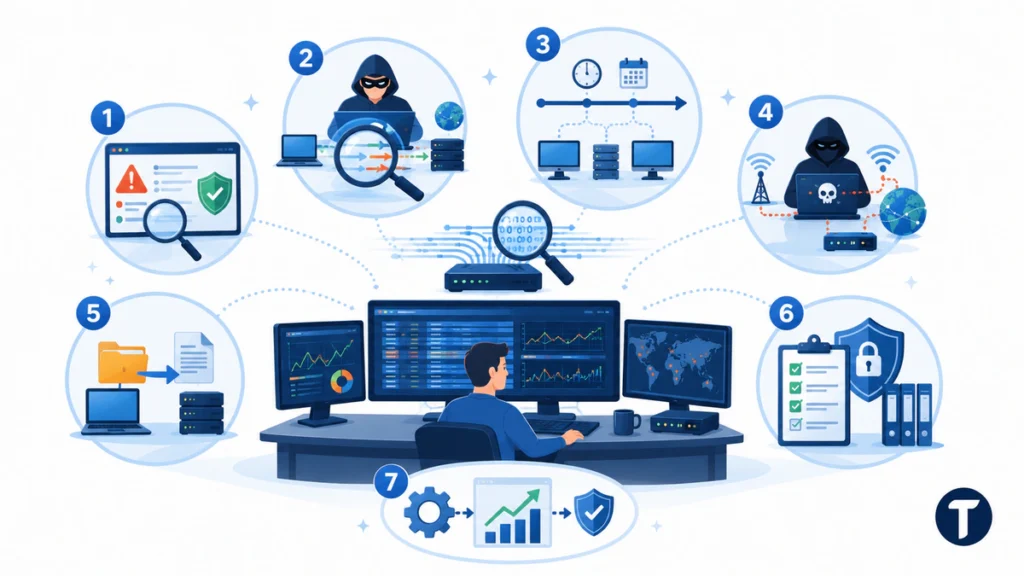
The 7 powerful benefits of captured packet data are:
- Alert validation
- Suspicious traffic investigation
- Incident reconstruction
- Command-and-control detection
- Data movement review
- Compliance support
- Detection improvement
Unlike logs or NetFlow, captured packets can show the network activity behind an event. This helps analysts move from “an alert fired” to “this is what actually happened on the network.”
What Is Packet Capture?
Packet capture is the process of recording network packets as they move through a network interface, switch span port, tap, cloud sensor, or capture appliance. The captured traffic can be saved as a PCAP file and analyzed later in tools such as Wireshark or an enterprise packet analysis platform.
For a deeper definition of capturing network traffic for forensic analysis, the concept is simple: capture network traffic for later analysis. The challenge is designing a capture plan that gives useful evidence without creating unnecessary storage, privacy, or performance risk.
What Does Packet Capture Show Security Teams?
The main value of packet data is detail. It can show source and destination addresses, ports, protocol fields, packet size, timestamps, payload clues, connection patterns, and signs of packet loss.
That level of detail matters because a firewall alert, endpoint alert, or SIEM rule may only show that something happened. Captured packets can help an analyst understand how it happened, which systems were involved, and whether the activity was benign, suspicious, or part of a breach.
However, this method does not always reveal readable content. Modern network traffic is often encrypted, which means analysts may not be able to inspect full payloads. Even then, captured data can still provide useful evidence through metadata, timing, endpoints, ports, packet sizes, protocol behavior, TLS handshake details, and connection patterns.
Why Packet Capture Matters in Cybersecurity Operations
Cybersecurity tools generate many signals. SIEM rules, NDR platforms, EDR alerts, intrusion detection systems, cloud logs, DNS logs, and identity logs all help teams detect risk. Yet these sources often summarize events instead of preserving the underlying network activity.
Captured traffic can provide stronger evidence when logs are incomplete, unclear, or disputed. If an alert says a host reached a suspicious server, packet data may help show the session timing, protocol, transferred data where visible, and whether the connection succeeded.
The NIST guide to intrusion detection and prevention systems explains that intrusion detection involves monitoring and analyzing events for potential incidents. Packet inspection and packet-level evidence can strengthen that work because they help teams validate what automated systems report.
These benefits are why traffic-capture tools often sit beside SIEM, IDS, IPS, NDR, and endpoint platforms rather than replacing them.
7 Powerful Benefits of Packet Capture for Cybersecurity Operations
1. Alert Validation
Packet-level evidence helps analysts confirm whether an alert reflects real suspicious activity or a false positive. This is useful when alerts come from SIEM rules, firewalls, IDS tools, IPS tools, EDR platforms, or NDR systems.
Instead of relying only on a summarized alert, analysts can review the related packet data for the same host, destination, port, protocol, and time window. That evidence can help teams decide whether to escalate, close, or investigate the alert further.
2. Suspicious Traffic Investigation
Captured traffic gives security teams more context when they need to investigate suspicious network activity. Analysts can inspect protocol behavior, traffic timing, endpoints, ports, packet sizes, and unusual communication patterns.
This can help reveal whether traffic is part of normal business activity, a misconfigured service, unauthorized scanning, malware behavior, or a possible intrusion attempt.
3. Incident Reconstruction
After a security incident, packet data can help teams reconstruct what happened before, during, and after the event. The evidence may show which systems communicated with one another, when sessions occurred, what protocols were used, and whether traffic patterns changed over time.
This is especially useful during incident response because teams need to understand scope, timeline, affected systems, and potential impact.
4. Command-and-Control Detection
Attackers often use command-and-control, or C2, communication to maintain access to compromised systems. Captured packets can help analysts look for beaconing, unusual protocols, suspicious destinations, irregular session behavior, and repeated outbound communication.
Packet-level evidence can also help security teams compare suspicious traffic against known attacker patterns and improve detection rules for future investigations.
5. Data Movement Review
Captured packet data may help teams assess whether data transfer occurred during a security event. This can be useful when investigating possible data exposure, unauthorized file movement, or suspicious outbound traffic.
The value depends on capture coverage, retention, encryption, and filtering rules. Captures may not always show readable content, especially when traffic is encrypted, but they can still provide useful evidence about timing, volume, destinations, and connection behavior.
6. Compliance Support
Traffic evidence can support compliance reviews where network evidence is allowed by policy, regulation, and retention rules. Regulated teams may use packet-level evidence to validate monitoring coverage, support forensic reviews, and document security investigations.
This benefit requires careful governance. Packet data can contain sensitive information, so teams need clear rules for access, retention, encryption, and documentation.
7. Detection Improvement
Packet evidence helps security teams improve detection logic after an investigation. Analysts can compare it with SIEM alerts, IDS signatures, IPS rules, NDR detections, firewall logs, and endpoint alerts.
This feedback loop can reduce false positives, improve alert quality, and help analysts build better response steps based on real network behavior.
How Does Packet Capture Compare with Logs and NetFlow?
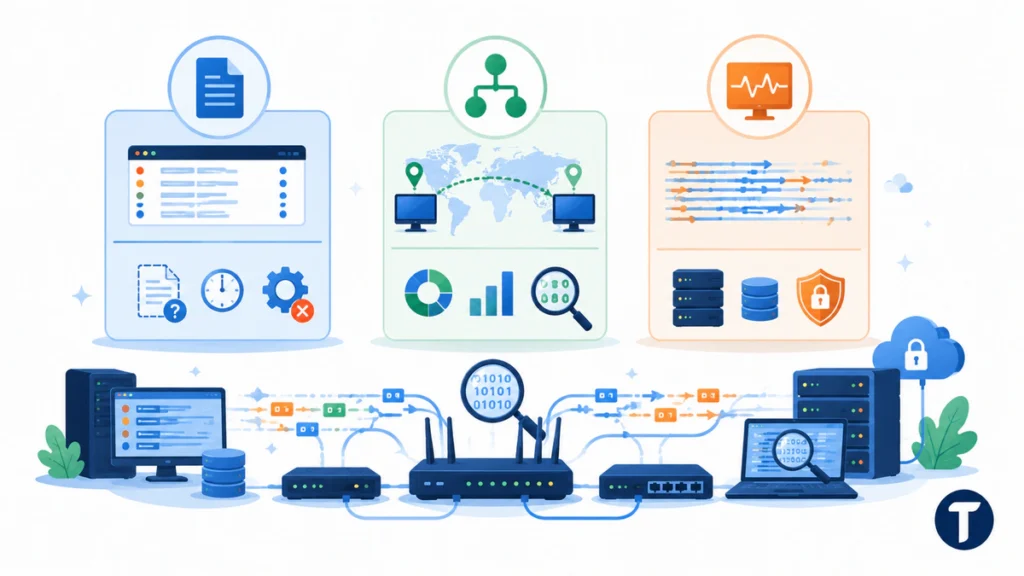
Logs, NetFlow, and packet data each answer different questions. A healthy security program usually needs all three.
| Data Source | What It Shows | Main Limitation |
|---|---|---|
| Logs | Events that a system decided to record | Logs can be missing, delayed, misconfigured, or altered |
| NetFlow or flow data | Who communicated with whom, when, and how much | Flow data usually does not include payload content or full protocol detail |
| Captured packets | Packet-level activity, including headers, timing, protocol behavior, and payload data where available | Full-packet collection can require significant storage, governance, and privacy controls |
Logs tell you what a system decided to record. They are efficient and easy to search, but they can be incomplete. A server log might show a login event without showing the full conversation that came before it.
NetFlow and flow data tell you who talked to whom. They are useful for volume trends, lateral movement clues, port usage, and anomaly detection. They do not usually include payload content, full protocol detail, or enough context for deep packet inspection.
Captured packets tell you what crossed the wire. They can preserve headers, sequence details, retransmissions, timing, and payload data when payloads are available. That makes them useful for root cause analysis, forensic review, and complex troubleshooting.
The tradeoff is cost and control. Full-packet collection can consume storage quickly, especially on busy enterprise networks. Teams need retention policies, filtering rules, encryption, access controls, and privacy safeguards before they collect traffic at scale.
Where Should a SOC Use Packet Capture?
A SOC should not capture everything everywhere without a reason. The better approach is to place capture points where captured traffic will answer important security questions.
Start where evidence has the highest value. That usually means internet edges, data center choke points, cloud ingress and egress paths, remote access gateways, critical application segments, and sensitive business systems.
Teams that are mapping visibility gaps can also review how network access control helps decide which users and devices should reach sensitive systems before packet evidence is needed.
Useful traffic-evidence use cases include:
- Incident Response: Analysts can review captured packets to understand scope, timing, affected systems, and possible data exposure.
- Threat Hunting: Hunters can search for protocol anomalies, beaconing, unusual payload patterns, and suspicious destinations.
- Network Troubleshooting: Network administrators can investigate packet loss, latency, retransmissions, and performance issues.
- Compliance Evidence: Regulated teams can validate monitoring coverage and preserve forensic records where appropriate.
- Tool Tuning: Security teams can compare packet analysis against alerts to reduce false positives and improve detection accuracy.
This is also where tooling needs differ. A small team may use Wireshark for targeted troubleshooting. A larger enterprise may need continuous full-packet collection, indexing, role-based access, long-term retention, and fast search across many sensors.
For those targeted captures, the Wireshark User’s Guide section on capturing covers the practical constraints teams hit first: which interface to select, what permissions the capture needs, and how to filter at capture time rather than collecting everything and sorting it later.
What Tools and Controls Make Packet Capture Safer?
Captured traffic can expose sensitive data if it is handled carelessly. Payloads may include credentials, tokens, personal data, internal hostnames, application content, or customer information.
The best programs treat packet data as sensitive evidence, not casual troubleshooting output. Access should be limited, logged, and tied to a clear investigation or operations need.
Before expanding coverage, define controls for:
- Scope: Decide which segments, ports, protocols, and systems need capture.
- Retention: Keep collected data only as long as the business, legal, and security need requires.
- Access: Restrict PCAP file access to trained analysts and approved administrators.
- Encryption: Protect stored data and secure any transfer between systems.
- Filtering: Reduce unnecessary payload collection where metadata or selective capture is enough.
- Documentation: Record why a capture point exists, what it collects, who can access it, and how evidence should be used.
Packet sniffing without governance creates risk. Governed traffic capture creates useful visibility while respecting privacy, legal obligations, and operational boundaries.
How Can Teams Turn Packet Data Into Action?
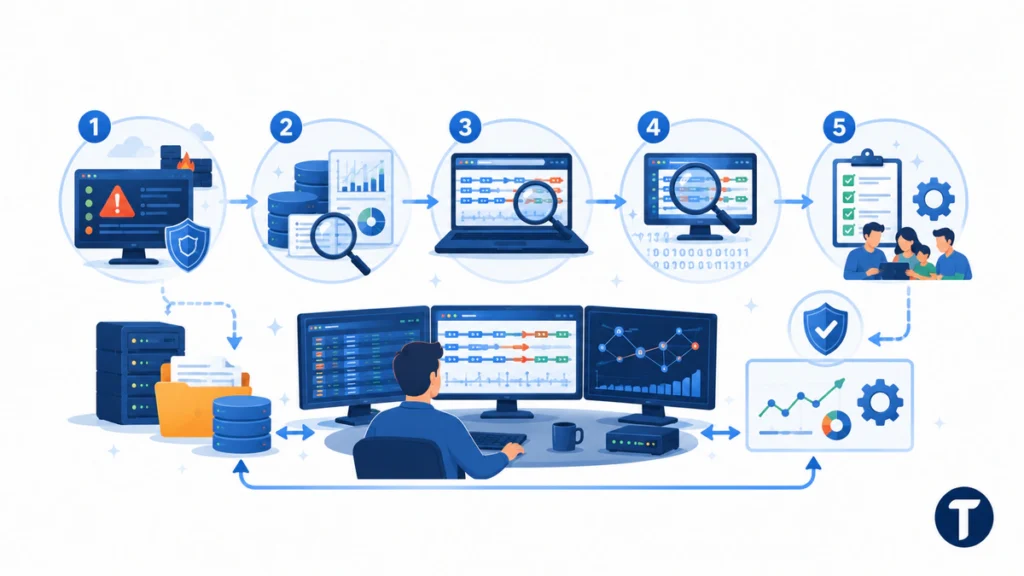
Captured data is only valuable when teams can use it quickly. A folder full of PCAP files does not improve detection and response unless analysts can search, interpret, and connect the evidence to decisions.
Build a repeatable workflow before an incident starts. Decide which alerts should trigger packet review, where captures are stored, who can open them, and how findings are added back into the case record.
A practical workflow looks like this:
- An alert appears in the SIEM, NDR, EDR, or firewall console.
- An analyst checks flow data and logs to frame the activity.
- The analyst opens the related capture window for the same host and time range.
- Packet analysis confirms the protocol, timing, anomaly, payload clues where available, or false positive.
- The team records the finding, tunes detection logic, and updates response steps.
This loop turns captured traffic from a technical archive into an operational capability. It also helps newer analysts learn what normal and abnormal traffic look like in the real environment.
Which Mistakes Reduce Packet Capture Value?
Many teams buy tools before they define the questions they need traffic evidence to answer. That creates blind spots in one area and too much data in another.
The goal is not to capture the most packets. The goal is to capture the right packets for security operations.
Common mistakes include:
- Capturing traffic without a retention or privacy policy.
- Relying on PCAPs while ignoring logs and NetFlow.
- Placing sensors where they miss critical east-west traffic.
- Keeping data that no analyst can search fast enough during an incident.
- Using full-packet collection for every problem when metadata would be enough.
- Assuming captures will show readable payloads even when traffic is encrypted.
- Failing to test capture quality after network changes.
A better approach is to map capture points to incident response, network monitoring, performance troubleshooting, and compliance requirements. Then test whether analysts can retrieve useful packet data within the time pressure of a real investigation.
FAQs About Packet Capture
What is packet capture in cybersecurity?
Packet capture is the process of recording network packets so security teams can analyze traffic details during monitoring, troubleshooting, incident response, and forensic investigations.
Why is packet capture important for cybersecurity operations?
It is important because analysts need packet-level evidence behind alerts, logs, and flow records. This helps teams validate security events, investigate suspicious traffic, and understand what happened on the network.
Is packet capture better than logs?
No. It is not a replacement for logs. Logs are easier to search and store, while captured packets provide deeper evidence. The strongest cybersecurity programs usually use logs, NetFlow, SIEM alerts, endpoint data, network detection tools, and packet evidence together.
Does packet capture work with encrypted traffic?
Yes, but encrypted traffic limits what analysts can see. Captures may not reveal readable payload content, but they can still show useful metadata such as endpoints, timing, ports, packet sizes, TLS handshake details, and connection patterns.
Where should packet capture be deployed?
Deploy capture points where the evidence has high security value. Common locations include internet edges, data center choke points, cloud ingress and egress paths, remote access gateways, critical application segments, and sensitive business systems.
How long should teams keep packet capture data?
Retention depends on business needs, legal requirements, privacy obligations, storage capacity, and incident response goals. Teams should define retention rules before collecting traffic at scale.
Can packet capture improve incident response?
Yes. It can improve incident response by helping analysts validate alerts, reconstruct activity, review suspicious communication, assess possible data movement, and tune detection logic after an investigation.
The takeaway
Packet capture is powerful because it gives security teams direct network evidence. It can validate alerts, explain suspicious traffic, support forensics, improve packet inspection, and help analysts troubleshoot issues that logs alone cannot explain.
For most organizations, the best answer is not unlimited full-packet collection across every segment. It is a balanced network security design that combines logs, NetFlow, metadata, capture tools, and clear operating controls.
If your team wants stronger security operations, captured traffic should be part of the evidence strategy. Used well, it gives analysts the packet-level context they need to detect threats, investigate incidents, and make better decisions.