Network Access Control: 7 Powerful Reasons Modern Businesses Need NAC
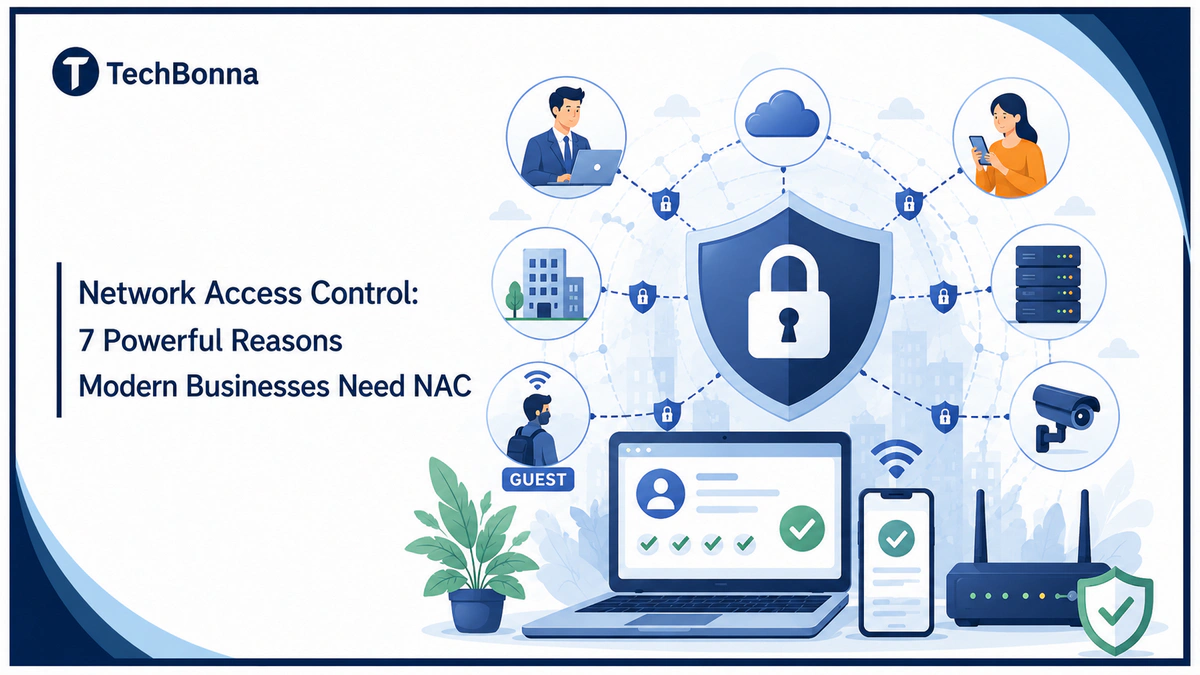
Table of Contents
Network access control is now a core part of business security because every user, device, and app can become a doorway into company systems. NAC gives teams a practical way to check identity, device health, and access rules before a connection reaches sensitive data, and modern network access control solutions make that process easier to manage across offices, cloud tools, and remote work.
A growing business no longer has one neat network edge. Staff use laptops, mobiles, guest Wi-Fi, contractors, SaaS apps, and home routers, so access needs to be checked every time it creates risk.
What it means
Network access control, or NAC, is a security method that decides who and what can connect to a business network. It checks users, devices, roles, security posture, and access policies before granting, limiting, or blocking network access.
Modern businesses need NAC because it reduces unauthorized access, protects sensitive systems, supports zero trust, improves network visibility, and keeps unmanaged devices away from critical resources.
Why Network Access Control Matters More Now

Business networks used to be simpler. A company had desks, office PCs, a server room, and a firewall at the edge. If you were inside the building, many systems trusted you by default.
That model has cracked. People now work from home, travel with laptops, connect phones to Wi-Fi, use cloud services, and invite partners into shared systems. A device can connect from a desk, a meeting room, a warehouse, a branch office, or a remote access session.
Network access control matters because trust can no longer depend on where someone is sitting. A good access system asks better questions before it grants access:
- Who is the user?
- What device are they using?
- Is the device known, healthy, and patched?
- What role does this person have?
- What network resources do they need?
- What risk does this connection create right now?
Those questions sound basic, but many businesses still answer them by habit instead of policy. Shared passwords, open guest networks, stale user accounts, and unmanaged devices create easy paths for attackers.
NAC brings discipline to access management. It connects identity, device posture, and security policies so the network can make smarter decisions.
A firewall still matters, but it does not replace access control at the connection level. A firewall filters traffic between zones or networks. NAC decides whether a user or device should be allowed to enter the network in the first place, then controls what it can reach after admission.
How NAC Works in Plain English
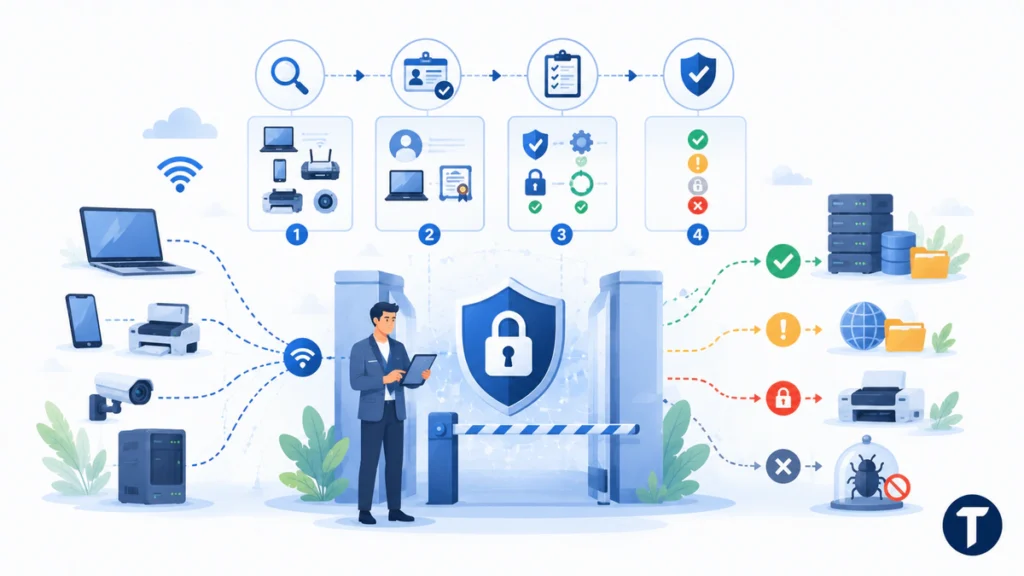
NAC is best understood as a gatekeeper with a checklist. When a device tries to connect to the network, the system checks it against company rules before it receives appropriate access.
Underneath most of this sits a standard rather than a product: IEEE 802.1X defines port-based network access control, which is how a switch or access point can require authentication before a device is given a working connection.
The process usually includes four steps:
- Discovery: The system sees a laptop, phone, printer, IoT device, or server trying to connect.
- Identification: It checks the user, device type, certificate, MAC address, identity provider, or other trusted signal.
- Assessment: It reviews posture signals such as operating system, patch level, antivirus status, encryption, ownership, or compliance state.
- Enforcement: It grants full access, gives limited guest access, places the device in quarantine, or blocks the connection.
This can happen before the device enters the network. That is pre-admission checking. It can also happen after a device is already connected. That is post-admission monitoring, and it watches for changes in behavior, risk, or compliance.
The value is not one single check. The value is consistent enforcement across messy real-world conditions.
For example, a managed finance laptop may receive access to accounting systems. A contractor laptop may receive internet access and one project folder. A guest phone may receive only isolated Wi-Fi. A printer may stay on a restricted segment. An unknown device may be blocked until IT reviews it.
That is visibility and control without asking people to make manual decisions for every connection.
7 Powerful Reasons Modern Businesses Need NAC
A business can run without NAC, but it usually pays for that choice with blind spots. Here are seven reasons this security layer has become important for modern network security.
NAC Reduces Unauthorized Access
Unauthorized access is not always dramatic. It can be a former employee account, a personal laptop on the wrong Wi-Fi, a visitor plugging into an open port, or a compromised device using a valid login.
This approach reduces that risk by checking both identity and device context. A username alone is not enough. The system can ask whether the device belongs to the business, whether it meets security policies, and whether the user role matches the requested access.
That extra context stops many weak connections before they become incidents.
For a small team, this can prevent accidental exposure. For a larger company, it creates a repeatable control that network teams can audit and improve.
NAC Supports Remote and Hybrid Work
Remote work changed the meaning of network entry. Staff may work from home, client sites, coworking spaces, hotels, and mobile hotspots. They still need secure access to apps and data, but IT has less control over the physical environment.
These controls give remote access decisions more structure. It can enforce access policies based on user identity, device health, location, authentication strength, and business role.
This is useful when a team has a mix of company-owned laptops and bring-your-own-device setups. A managed device can receive wider access. A personal device can receive limited secure access. A risky device can be blocked or sent through a remediation workflow.
The goal is not to make remote work harder. The goal is to make access safer without turning IT into a ticket queue.
NAC Gives IT Teams Better Network Visibility
You cannot protect what you cannot see. Many businesses think they know what is connected until they run a proper inventory.
Then they find old printers, forgotten access points, personal tablets, test servers, camera systems, badge readers, and vendor devices. Some are harmless. Some are not.
Access control tools improve network visibility by showing what is connected, where it is connected, and how it is being classified. That view gives IT and security teams a stronger base for decisions.
Good visibility turns network security from guesswork into management.
It also improves everyday troubleshooting. When someone cannot connect, IT can see whether the issue is identity, device health, policy, or network placement.
NAC Makes Zero Trust More Practical
Zero trust is easy to say and hard to run. The idea is simple: never trust by default, verify access, and limit what each user or device can reach.
The US National Institute of Standards and Technology explains this model in its Zero Trust Architecture guidance, where access decisions depend on identity, device state, policy, and continuous evaluation.
This turns that principle into a network layer control. It can check devices before they enter the environment, apply role-based access, and restrict movement between systems.
Zero trust network access and connection-level access control are not the same thing, but they support the same direction. Both reduce broad, flat access. Both make access decisions more specific. Both push teams toward least privilege.
A company does not need to complete a huge transformation before it starts. This type of access control can be one practical step toward zero trust.
Protects Against Device Sprawl
Modern offices are full of devices. Laptops and phones are only the start. There may be smart TVs, printers, VoIP phones, sensors, point-of-sale terminals, tablets, cameras, and building systems.
Some devices cannot run normal endpoint security tools. Others are managed by vendors. Some are old but still business-critical.
Network admission control gives teams a way to classify these assets and keep them in the right place. A camera should not access payroll. A guest tablet should not see internal file shares. A building sensor should not talk to the whole corporate network.
This is useful because access can still be enforced when the device itself has limited security controls.
This matters more as companies add IoT systems, operational tools, and shared workplace technology.
Improves Compliance and Audit Readiness
Compliance is easier when access rules are visible and repeatable. Many frameworks expect businesses to restrict access, review permissions, protect sensitive data, and prove that controls exist.
The system helps by turning access policies into enforceable rules. It can show which device connected, which user authenticated, what access was granted, and why.
That record can support audits, incident reviews, and internal governance. It also makes policy drift easier to spot.
A policy written in a document is useful. A policy enforced at connection time is stronger.
Limits Damage When Something Goes Wrong
No control stops every problem. A user may click a phishing link. A laptop may miss patches. A password may be stolen. A supplier account may be abused.
These controls help limit the blast radius. It can place risky devices into quarantine, restrict access to only needed systems, or block network activity that does not match the device or user profile.
This does not replace endpoint detection, email security, backups, or staff training. It adds another layer.
Teams that want to validate these controls can also use penetration testing services to find weak points before attackers do.
The point is simple: if one device fails, the whole network should not fail with it.
Common Use Cases for Network Access Control
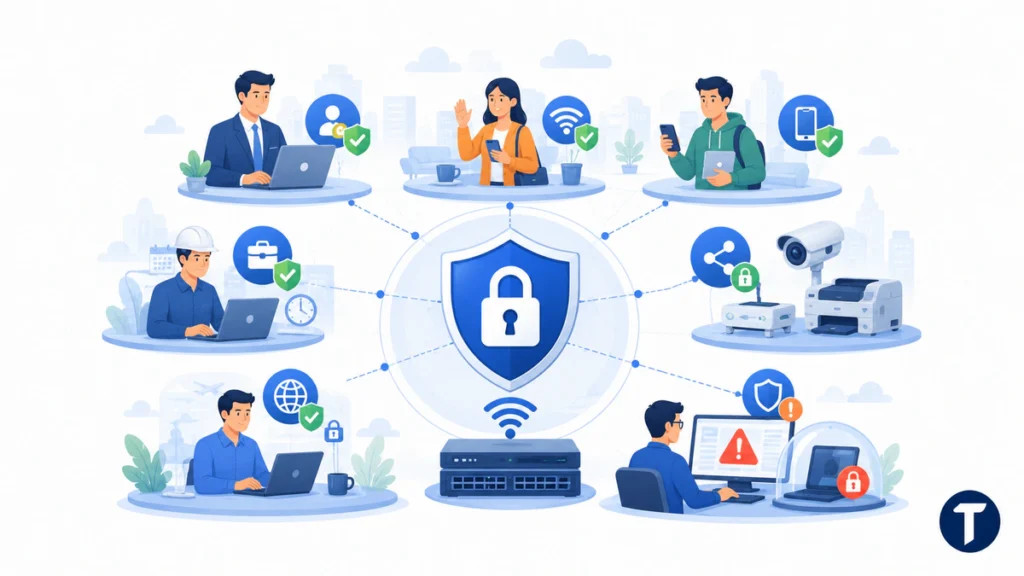
NAC is not only for large enterprises. Its use cases appear in many normal business situations.
A growing company may use it for:
- Employee access: Staff connect to the corporate network with devices that meet security policies.
- Guest access: Visitors receive internet-only access on an isolated network.
- BYOD access: Personal phones and laptops receive limited access based on role and device posture.
- Contractor access: External workers get project-specific permissions with expiry dates.
- IoT segmentation: Printers, cameras, sensors, and other devices stay away from sensitive systems.
- Remote access: Users connect through approved devices and authentication methods.
- Incident response: Suspicious devices move into quarantine while IT investigates.
These use cases sound different, but the principle is the same. The system links identity, device context, and access controls so each connection receives the right level of trust.
This is where modern network access control solutions can save time. Tools such as Portnox are built around needs such as device visibility, policy enforcement, and secure access, giving IT teams an example of how the market has moved from manual network checks toward cloud-managed access control.
The tool choice matters, but the bigger point is strategy. A business should know who can connect, which devices are trusted, and what each connection can reach.
Features of NAC That Businesses Should Look For
Not every solution fits every company. A small business does not need the same design as a hospital, university, factory, or global SaaS company.
Still, several access control features are worth checking before you choose a platform.
Clear Device Discovery
The system should show what is connected without forcing the IT team to build a perfect inventory first. Discovery should include managed devices, unmanaged devices, guest devices, and unknown assets.
Policy-Based Access
Access policies should be clear enough to manage. A good solution lets teams build rules around identity, role, device type, location, posture, and risk.
Integration With Existing Tools
The platform should work with identity providers, endpoint tools, Wi-Fi systems, switches, firewalls, MDM platforms, and logging tools. Isolated security tools create more work.
Strong Guest and Contractor Controls
Guest access should be separate from internal resources. Contractor access should be time-limited, scoped, and easy to remove.
Support for Cloud and Hybrid Networks
Many businesses now run across office networks, cloud resources, SaaS apps, and remote users. Access controls need to fit that model rather than only protect a private network in one building.
Practical Reporting
Reports should answer useful questions. Who connected? From where? With what device? Was access granted, limited, or blocked? Which security policies applied?
The best platform is the one your team can run well, not the one with the longest feature list.
Types of Network Access Control
There are several types of network access control, and most real deployments combine more than one.
Pre-admission checks review a device before it can enter the network. This is useful for blocking unknown or unhealthy devices early.
Post-admission monitoring keeps watching after a device connects. This matters because risk can change during a session. A device may fall out of compliance, behave strangely, or try to reach resources it should not touch.
Agent-based NAC uses software installed on endpoints to collect posture information. Agentless methods rely on network signals, integrations, certificates, or external tools. Many businesses need both, especially when they have IoT or vendor-managed devices.
Role-based access assigns permissions based on user role, department, device type, or business need. This supports least privilege and reduces broad access.
Granular access controls can also segment users and devices into smaller zones. That makes lateral movement harder if one account or endpoint is compromised.
These types are not competing ideas. They are building blocks. The right mix depends on the size of the company, the network infrastructure, and the level of risk.
How to Implement NAC Without Creating Chaos
A rollout can create friction if it is handled without planning. The safest path is gradual and practical.
Start by finding what is connected. This discovery stage gives you an inventory of users, devices, systems, and network activity. It also reveals exceptions before enforcement begins.
Then create simple access policies. Begin with high-value areas such as finance systems, admin tools, customer data, and internal file stores. Avoid trying to solve every edge case on day one.
A sensible rollout looks like this:
- Map users, devices, locations, and critical systems.
- Classify devices as managed, unmanaged, guest, IoT, or unknown.
- Define access policies for each group.
- Test rules in monitor mode before enforcement.
- Pilot with one department or location.
- Add remediation paths for blocked or non-compliant devices.
- Expand enforcement in stages.
- Review reports and tune policies after launch.
A calm rollout protects the business without surprising users.
Communication matters. People should know why access rules are changing, what they need to do, and how to get help if a device is blocked.
NAC Mistakes to Avoid
The biggest mistake is treating the project like a one-time installation. It should be a living access control program. It needs maintenance, reporting, and policy reviews.
Another mistake is making rules too strict too quickly. Blocking the wrong devices can disrupt work and damage trust in the project. Start with visibility, then move into enforcement.
Weak exception handling is also common. Every business has edge cases, but permanent exceptions become security holes. Give exceptions owners, expiry dates, and review cycles.
Avoid using this control as a replacement for basic security. It works best with strong identity management, multi-factor authentication, endpoint protection, patching, backups, and staff awareness.
The last mistake is ignoring user experience. Security controls work better when people understand them. Clear messages, self-service remediation, and fast support make the program easier to accept.
The takeaway
Network access control gives modern businesses a safer way to manage who and what can connect to their systems. It is not just a technical add-on; it is a practical security layer that supports network access control solutions, zero trust planning, device visibility, and stronger access controls as teams grow.
If your business has remote workers, guest Wi-Fi, contractors, cloud tools, IoT devices, or sensitive data, NAC deserves a serious look. The sooner you know what is connecting and why, the easier it becomes to protect the network without slowing everyone down.