
What is the Difference Between WiFi and Internet?
Table of Contents
Introduction
The difference between WiFi and Internet is easy to miss because most home devices use both at the same time. WiFi connects a phone, laptop, or smart TV to a nearby router, while the internet connects that local network to websites, cloud services, and other networks around the world.
This guide explains the difference between WiFi and the Internet through real examples, including a WiFi connected but no Internet warning, the role of a modem and router, and WiFi vs Ethernet for everyday use.
Quick Answer
The difference between WiFi and Internet is that WiFi is a local wireless connection, while the internet is the outside network service delivered by an internet service provider. A device can join WiFi even when the provider service is unavailable, and it can reach the internet without WiFi through Ethernet or cellular data.
- WiFi connects nearby devices to a local network.
- The internet connects that local network to websites and online services.
- A router creates and manages the local wired or wireless network.
- A modem or optical network terminal connects the router to the provider.
What the Internet Is
The internet is a worldwide system of connected networks. It carries data between homes, businesses, data centers, websites, apps, and cloud services. When you send an email, stream a movie, join a video call, or open an online document, data travels beyond your home network to one or more remote systems.
The Internet Society explanation of how the internet works describes it as tens of thousands of interconnected networks that communicate through open standards. That wider network-of-networks is separate from the local WiFi link between a device and its router.
An internet service provider, commonly called an ISP, delivers that outside connection. Depending on the location and plan, the service may arrive through fiber, cable, DSL, fixed wireless, cellular, or satellite technology.
The provider connection usually enters a modem, gateway, or optical network terminal. That equipment translates the incoming service into a connection your router can share. The internet does not depend on WiFi specifically. A desktop computer connected by Ethernet can use the same internet service without using a wireless signal.
Internet speed is normally measured in megabits per second or gigabits per second. The speed purchased from an ISP sets an upper limit, but it does not guarantee that every device will receive the full amount. Router quality, local congestion, signal strength, device capability, and the remote service can all affect actual performance.
What WiFi Is
WiFi is a wireless networking technology that lets compatible devices communicate with a nearby router or access point through radio signals. It is commonly used inside homes, offices, schools, hotels, and public spaces because it removes the need to run a cable to every device.
WiFi is based on the IEEE 802.11 family of wireless local area network standards. The IEEE overview of WiFi standards explains how these standards support wireless data transmission across different WiFi generations and frequency bands.
A WiFi network can exist without an active internet connection. Devices connected to the same local network may still be able to print, share files, cast local media, access network storage, or communicate with a local smart-home hub. Those activities stay inside the network instead of reaching an outside website or cloud service.
WiFi quality depends on the router, access point, device, band, distance, walls, nearby networks, and radio interference. A strong WiFi signal only means the device can communicate with the local equipment. It does not prove that the router has a working path to the internet.
How WiFi and Internet Work Together
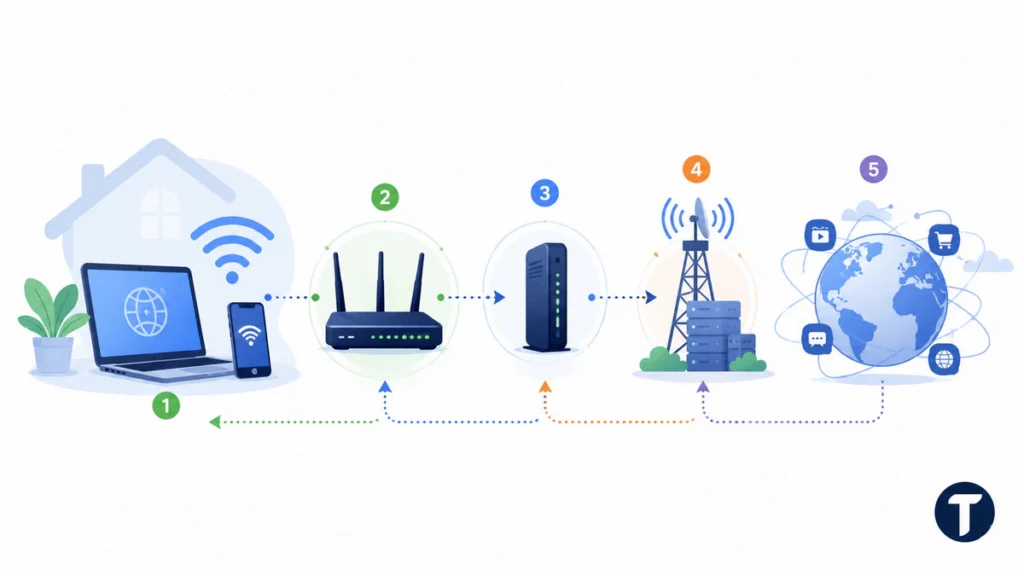
In a typical home, WiFi and internet work as separate links in the same path:
- A phone or laptop connects to the router through WiFi.
- The router directs traffic within the local network.
- A modem, gateway, or optical network terminal connects the router to the ISP.
- The ISP carries the request to the wider internet.
- The website or app sends data back through the same general route.
Think of WiFi as the connection between your device and the front door of your network. The internet is the road system beyond that door. A clear path inside the home does not help when the provider route is down. A working provider line also does not help a device that cannot reach the router.
Some gateways combine the modem and router in one box. That can make the two services feel like one product, but the functions remain different. The gateway can continue broadcasting a WiFi name even when its connection to the ISP has failed. Following this path is the easiest way to understand the difference between WiFi and Internet.
Key Differences Between WiFi and Internet
The table below shows where the two terms differ and why the distinction matters during setup or troubleshooting.
| Feature | WiFi | Internet |
|---|---|---|
| Main purpose | Connects devices to a local network without cables | Connects networks and devices to online services worldwide |
| Typical provider | A router or wireless access point | An ISP using fiber, cable, DSL, cellular, fixed wireless, or satellite |
| Physical range | Usually limited to a home, office, or nearby area | Reaches across regional and global networks |
| Can work without the other? | Yes, for local network tasks | Yes, through Ethernet, cellular data, or another non-WiFi connection |
| Common failure sign | Weak signal, missing network name, or one room losing access | All devices lose online access or the modem loses service |
| Main speed limits | Router generation, distance, band, interference, and device hardware | ISP plan, provider capacity, line quality, and remote service performance |
The practical difference between WiFi and Internet is location and function. WiFi handles the nearby connection. The internet handles the outside route.
Why WiFi Can Be Connected Without Internet
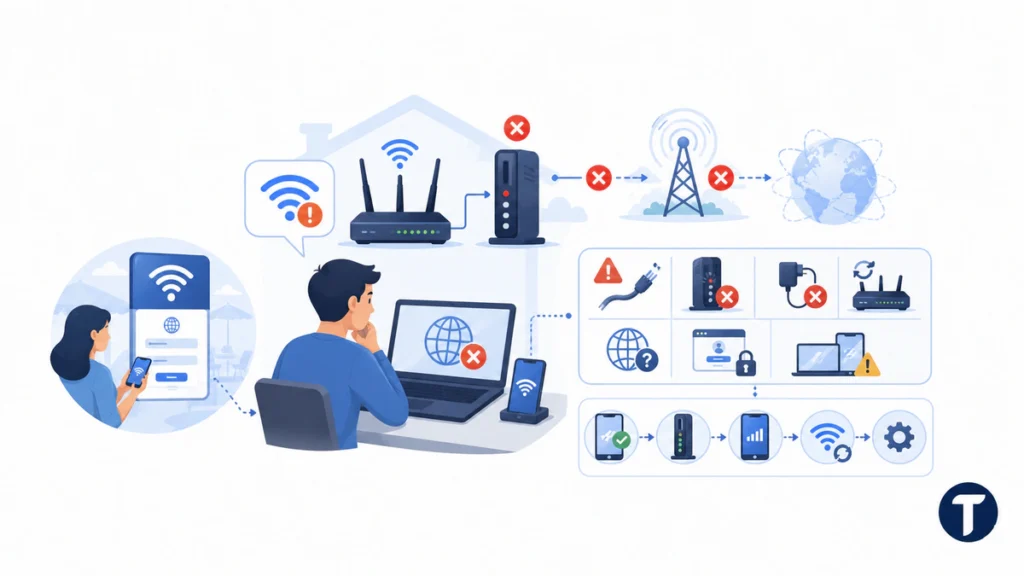
A WiFi connected but no Internet message means the device successfully joined the local wireless network, but that network cannot reach online services. The WiFi radio link may be working normally even though another part of the path has failed. That is why a WiFi connected but no Internet warning should be treated as a path failure, not automatic proof that the router’s radio is broken.
Common causes include:
- An ISP outage or damaged provider line
- A modem or gateway that lost synchronization
- A loose cable or failed power adapter
- A router software problem
- A DNS or IP address error
- A service account or captive-portal login issue
- A problem affecting only one phone, laptop, or app
Start by testing another device. If every connected device shows the same WiFi connected but no Internet warning, check the modem or gateway lights and the provider status page using cellular data. If only one device fails, forget and rejoin the network, restart that device, and check its VPN, proxy, DNS, and network settings.
A public network can create the same warning before you accept its terms or complete its browser login page. In that case, the device has joined WiFi, but the network has not yet granted internet access.
WiFi vs Ethernet: Which Connection Is Better?
WiFi is convenient because phones, tablets, laptops, and smart devices can move around without a cable. Ethernet is usually the better choice when stability, predictable latency, or sustained speed matters more than mobility.
An Ethernet connection links a device directly to a router, switch, or gateway. It avoids most radio interference and can help with gaming, desktop work, large file transfers, video calls, and smart TVs that remain in one place.
The WiFi vs Ethernet decision depends on the device and room:
- Use WiFi for mobile devices and locations where running cable is impractical.
- Use Ethernet for fixed devices that need consistent performance.
- Test Ethernet when you need to determine whether a problem comes from the provider or the wireless network.
- Use both when a home has a mix of mobile and stationary equipment.
Ethernet cannot fix an ISP outage or increase the speed beyond the purchased plan. It can, however, remove local wireless conditions from the test. A simple WiFi vs Ethernet test can isolate the local radio link, which makes WiFi vs Ethernet useful for both performance planning and troubleshooting.
2.4 GHz vs 5 GHz WiFi: Which Band Should You Use?
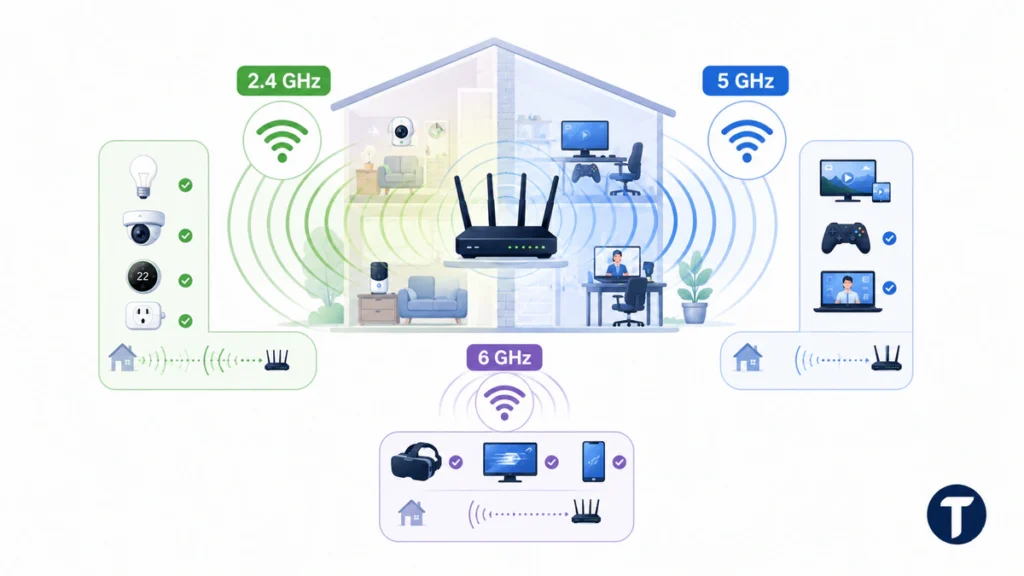
Many routers offer both 2.4 GHz and 5 GHz WiFi. These are radio frequency bands, not internet plan speeds and not the same as cellular 5G.
The 2.4 GHz band generally travels farther and passes through obstacles better, but it often has more interference from neighboring networks and household devices. It can suit smart-home equipment, distant rooms, and devices that do not require the highest local speed.
The 5 GHz band generally offers higher local performance and more usable channel space at shorter distances. It can suit streaming, gaming, work calls, and downloads when the device is relatively close to the router.
Choose the band based on the real environment:
- Use 2.4 GHz when range and wall penetration matter most.
- Use 5 GHz when speed and lower congestion matter most.
- Test both when a device drops repeatedly or performs poorly.
- Let band steering manage the choice when the router and devices handle it reliably.
Some newer equipment also supports 6 GHz through WiFi 6E or WiFi 7. That band can provide more capacity for compatible devices, but its shorter reach makes router placement important.
How to Use Internet Without Home WiFi
You do not need a home WiFi network to use the internet. Several connection methods can bypass WiFi completely or replace a traditional wired ISP.
Options include:
- Ethernet: Connect a computer directly to a router or gateway with a network cable.
- Cellular data: Use a phone, tablet, or cellular-enabled laptop through a mobile carrier.
- USB tethering: Share a phone’s cellular connection with a computer through a USB cable.
- Fixed wireless service: Receive internet from a nearby provider antenna, then connect a device by Ethernet if you do not want local WiFi.
- Public wired access: Some offices, hotels, libraries, and campuses provide Ethernet ports.
A mobile hotspot often uses cellular service for the outside connection but creates WiFi for nearby devices. It is internet without cable or satellite, but it is not necessarily internet without WiFi.
How to Troubleshoot the Right Connection
The fastest troubleshooting method is to identify which layer failed before replacing equipment or changing several settings at once.
Follow this order:
- Check whether the device can see and join the WiFi network.
- Test a second device on the same network.
- Check whether a wired Ethernet device can reach the internet.
- Read the modem, gateway, or optical terminal lights before restarting.
- Check the ISP’s outage page or app using cellular data.
- Restart the modem and router in the provider’s recommended order.
- Test one change at a time and record what improves or fails.
If Ethernet works but WiFi does not, focus on router placement, interference, band settings, firmware, or the affected device. If the same WiFi connected but no Internet message appears on several devices, or wired and wireless devices both fail, focus on the modem, provider line, service account, power, or ISP outage.
When disconnects continue after basic checks, use TechBonna’s guide to why your Internet keeps going out to document the pattern and isolate provider, modem, router, cable, or device faults. This moves the reader from understanding the difference between WiFi and Internet to taking specific corrective action.
Frequently Asked Questions
The answers below clarify the most common points of confusion about WiFi, internet service, Ethernet, and wireless frequency bands.
Can You Have WiFi Without Internet?
Yes. A router can broadcast a WiFi network and connect local devices even when the ISP service is unavailable. Local printing, file sharing, network storage, and some smart-home controls may continue to work, but websites and cloud services will not load.
Can You Have Internet Without WiFi?
Yes. Ethernet, cellular data, USB tethering, and some direct wired connections provide internet access without using WiFi. The device still needs an internet service path, but the local connection does not have to be wireless.
Why Does My Phone Show WiFi Connected but No Internet?
A WiFi connected but no Internet warning means the phone reached the router but could not reach online services. Check another device, the modem lights, the ISP status page, and any required public-network login. If only the phone fails, reset its local network connection before changing the whole router.
Does Better WiFi Make the Internet Faster?
Better WiFi can improve local speed, coverage, stability, and the amount of the ISP plan that reaches a device. It cannot make the provider plan faster than its subscribed limit or repair an outside outage. The difference between WiFi and Internet explains why upgrading the router and upgrading the service plan solve different problems.
Is 5G the Same as 5 GHz WiFi?
No. 5G is a generation of cellular service provided through mobile networks. 5 GHz is a radio band used by local WiFi equipment. A 5G home internet gateway may use cellular service outside the home and then share it through 2.4 GHz, 5 GHz, or 6 GHz WiFi inside the home.
Is WiFi Free Internet?
Not automatically. WiFi is a connection method. A home network normally shares a paid ISP service, while a business or public location may offer internet access free, require payment, or ask users to accept terms through a login page.
Is WiFi vs Ethernet More Important Than the Internet Plan?
Both matter. The internet plan controls the service entering the home, while WiFi vs Ethernet affects how a device reaches the router. A faster plan may not solve weak coverage, and Ethernet may not solve a provider outage.
Final Thoughts
WiFi and the internet usually work together, but they solve different parts of the connection. WiFi carries data between a device and the local router, while the internet carries data between that network and online services.
Once you understand the difference between WiFi and Internet, a WiFi connected but no Internet message becomes easier to diagnose, and WiFi vs Ethernet becomes a practical choice instead of a confusing one. Test the local network first, test the provider connection second, and change only the part that is actually failing.



One Comment
Comments are closed.