
ERP Inventory Management: Complete Guide to ERP Inventory Systems in 2026
Table of Contents
ERP inventory management helps companies connect stock control, purchasing, warehouse activity, sales orders, and finance inside one operating system. The goal is not just counting products. It is making ERP inventory systems reliable enough that inventory workflows support daily decisions instead of creating more spreadsheet work.
This guide explains how ERP inventory management works in practice, where ERP inventory systems fit, and which inventory workflows matter most during selection and implementation. It keeps the focus on process design, examples, controls, and measurable operating improvements.
In brief
ERP inventory management is the use of an ERP system to track items, quantities, locations, purchases, orders, costs, transfers, and replenishment across the business. Good ERP inventory systems give purchasing, warehouse, sales, operations, and finance teams one trusted inventory record.
The best results come from clear inventory workflows: forecast demand, create purchase orders, receive goods, store stock, allocate items, pick and ship orders, post financial updates, review exceptions, and replenish before stockouts happen.
How ERP Inventory Management Works
ERP inventory management works by turning each stock movement into a shared transaction. A purchase order affects expected supply. A receipt updates inventory data. A sales order reserves stock. A shipment reduces on-hand quantity and can trigger revenue, cost, and margin reporting.
That is why inventory control and stock tracking work inside an ERP is different from a simple counting app. ERP inventory systems connect stock with procurement, order management, customer relationship management, accounting, warehouse management, and reporting.
In practical terms, ERP inventory management should answer four questions at any time: what stock exists, where it sits, what it costs, and what action should happen next. Inventory workflows are the rules that make those answers consistent.
Core Inventory Workflows to Map First
Before choosing software, map the inventory workflows that already run the business. Most companies need item setup, supplier records, purchase orders, receiving, putaway, warehouse transfers, order allocation, picking, packing, shipping, returns, cycle counting, adjustments, and replenishment.
ERP inventory systems become easier to configure when each workflow has an owner, trigger, record, exception path, and approval rule. If nobody owns item creation or stock adjustments, ERP inventory management will lose accuracy quickly.
| Workflow | ERP Record | Decision Point |
|---|---|---|
| Demand planning | Forecast and reorder rules | Buy now, build later, or wait |
| Purchasing | Purchase order | Approve order, change supplier, or use existing stock |
| Receiving | Goods receipt | Accept, partially receive, or quarantine |
| Warehouse movement | Location transfer | Move, hold, count, or investigate |
| Order fulfillment | Sales order and shipment | Allocate, backorder, substitute, or cancel |
| Finance posting | Inventory value and COGS | Reconcile, adjust, or review margin |
Simple ERP Inventory Process Diagram
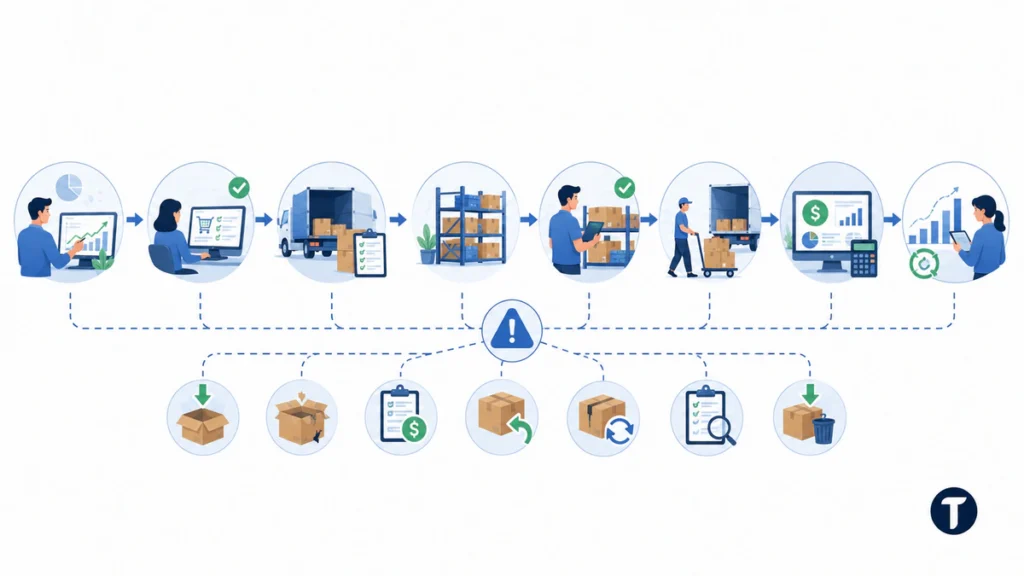
A simple ERP inventory management process can be shown as a straight flow, but each stage should still have clear controls.
Forecast Demand → Create Purchase Order → Receive Goods → Store Stock → Allocate to Orders → Pick and Ship → Update Finance → Review Replenishment.
A better process diagram also shows exceptions. ERP inventory systems should support partial receipts, damaged goods, supplier credits, customer returns, substitutions, backorders, cycle-count variance, and stock write-offs. Those exception paths are where inventory workflows often break, so inventory workflows need documented owners and fallback rules.
ERP Inventory Systems Versus Standalone Inventory Software
Standalone inventory software can be useful when a team mainly needs barcode scanning, stock counts, and warehouse visibility. ERP inventory systems go further because inventory changes affect purchasing, sales, accounting, forecasting, and business reporting in the same environment.
| Capability | Standalone Inventory Software | ERP Inventory Systems |
|---|---|---|
| Stock counts | Usually supported | Supported and tied to finance |
| Purchase orders | Sometimes included | Usually integrated with suppliers and approvals |
| Manufacturing | Limited or add-on | Can connect to BOMs and production orders |
| Finance impact | Often exported later | Posted through accounting rules |
| Multi-site control | Varies by tool | Designed for shared locations and reporting |
A small retailer may not need an ERP system for inventory. A distributor, manufacturer, ecommerce brand, or multi-location business may need ERP inventory management once manual systems can no longer protect availability, cost accuracy, or customer promises.
Features to Look for in an ERP Inventory Management System
The most useful ERP inventory management features are practical rather than flashy. Look for item master controls, SKU rules, barcode support, multiple units of measure, serial or lot tracking, bin locations, warehouse transfers, purchase approvals, supplier lead times, demand forecasting, reorder points, safety stock, landed cost, and cycle counting.
Barcode support deserves a decision rather than a tick box. Under the GS1 barcode standards, the identifier is globally unique and is what trading partners, carriers and retailers already expect to scan on a case or a pallet, so settling it at item-master stage avoids relabelling stock later when a customer or marketplace insists on it.
ERP inventory systems should also provide real-time inventory visibility. Managers need to see inventory levels, backorders, open purchase orders, future demand, inventory turnover, and gross margin by item without asking three teams to rebuild the same report.
For teams reviewing broader business software, TechBonna also compares ERP systems for small businesses with practical selection checks. That broader comparison can help leaders decide whether ERP inventory management belongs in a full ERP rollout or a narrower operations upgrade.
Implementation Example: Distributor With Two Warehouses
A distributor may start with poor visibility across two warehouses. Sales promises items that are not available, purchasing overorders slow-moving stock, and finance waits for manual counts before closing the month. ERP inventory management can fix the pattern only if the process is redesigned, not just imported.
The implementation should standardize item codes, units, barcodes, supplier item numbers, location rules, receiving steps, transfer approvals, and replenishment triggers. ERP inventory systems then give each team the same current inventory view.
The first improvement is usually data discipline. If item names, costs, supplier records, and warehouse locations are inconsistent, automation will only move bad data faster. Clean data turns inventory workflows into repeatable routines.
Implementation Example: Ecommerce Brand
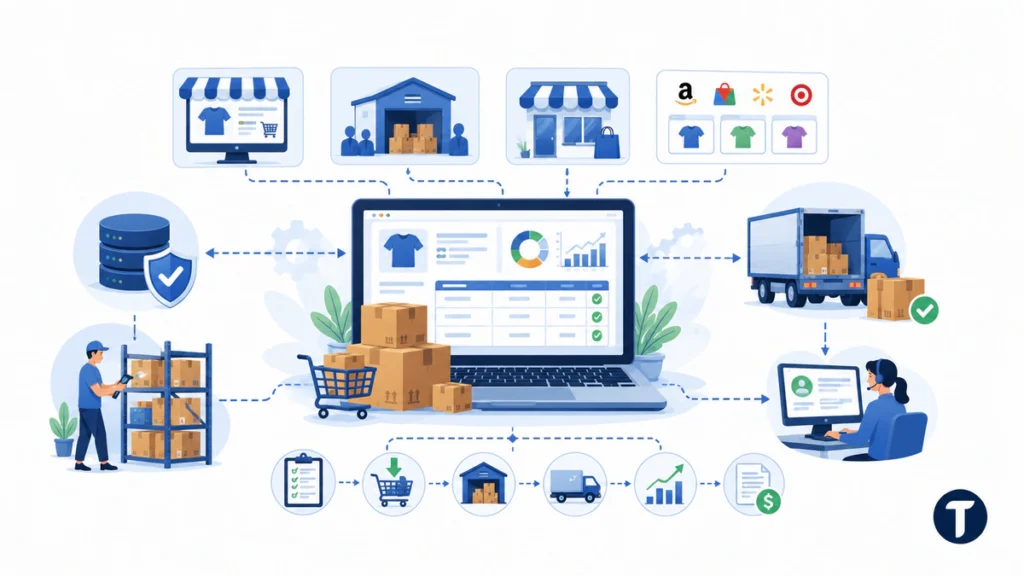
An ecommerce brand may sell through its own store, wholesale customers, retail partners, and marketplaces. Without ERP inventory management, each channel may show a different quantity. The result is overselling, refunds, missed delivery promises, and manual reconciliation.
ERP inventory systems can centralize item records, reserve stock, sync orders, trigger purchase orders, update shipping status, and post finance records. Inventory workflows still need warehouse discipline, but the system creates a single operational record.
For ecommerce teams, test integrations carefully. Storefront, marketplace, shipping, payment, tax, and customer-service systems should not create duplicate stock records or delayed availability updates.
Implementation Example: Light Manufacturer
A light manufacturer needs raw materials, work in progress, finished goods, and production planning. ERP inventory management links bills of materials, purchase orders, production orders, quality checks, scrap, substitutions, and finished-stock availability.
This use case needs more than basic inventory tracking. ERP inventory systems must support lot tracking, supplier reliability, lead times, material requirements, costing, and production exceptions. Inventory workflows should show what happens when a component is short, damaged, substituted, or received late.
Data Cleanup Before Implementation
Data cleanup should happen before configuration. Remove duplicate SKUs, standardize units of measure, confirm supplier numbers, review inactive products, verify opening balances, and decide how to treat obsolete, damaged, or slow-moving items.
ERP inventory management depends on trusted inventory records. If users see bad data after launch, they will return to spreadsheets. Clean inventory data improves purchasing, order allocation, finance reporting, and warehouse trust.
Controls After Launch
After launch, assign ownership for item creation, stock adjustments, reorder rules, and cycle counting. ERP inventory systems should not let every user create SKUs or adjust stock without review. Loose permissions can undermine inventory accuracy in a few weeks.
Set a review rhythm. Weekly checks can focus on stockouts, backorders, supplier delays, and high-value adjustments. Monthly checks should compare physical counts, ERP quantities, inventory value, and unexplained variance.
The U.S. Census Bureau inventory-to-sales ratios can also help leaders understand wider inventory pressure. Internal metrics still matter most, but external benchmarks add context when purchasing and working-capital decisions are under review.
Metrics to Track
ERP inventory management should be judged by business outcomes. Useful metrics include inventory accuracy, stockout frequency, days inventory on hand, order fill rate, purchase-order cycle time, obsolete stock value, cycle-count variance, supplier lead-time variance, and gross margin by product line.
Dashboards should be simple enough for warehouse, purchasing, and finance teams to use regularly. A complicated report that nobody reviews does not improve inventory workflows or control over inventory.
Common Failure Points
Common failures include launching before data cleanup, ignoring warehouse staff during design, creating too many custom fields, skipping returns testing, failing to reconcile inventory value with finance, and treating training as a one-time classroom session.
ERP inventory systems also fail when leaders automate unclear processes. If the business cannot explain who approves a stock adjustment or how a backorder should be handled, the ERP will not solve the problem. It will expose it.
How to Choose the Right ERP System for Inventory Management
Start with business needs, not vendor demos. Ask whether the ERP supports multiple warehouses, bin locations, serial numbers, lots, kits, bundles, bills of materials, purchase approvals, supplier lead times, reorder rules, returns, and integration with sales channels.
Then test real inventory workflows. Receive a partial purchase order, move stock between locations, allocate an order, process a return, adjust damaged goods, run a cycle count, and reconcile inventory value. ERP inventory management should make those tasks clearer, not slower.
Benefits of ERP Inventory Management

The main benefits of ERP inventory management are visibility, accuracy, faster replenishment, better customer promises, cleaner inventory planning, and stronger finance control. When ERP inventory systems are configured well, teams can see current inventory, future demand, open orders, supplier delays, and cost impact without waiting for manual reports.
Effective ERP inventory management also improves inventory performance because the same software solution supports purchasing, warehouse management, sales, accounting, and business strategies. That shared model reduces duplicate software systems and gives leaders more control over inventory decisions.
Best Practices for Implementing an ERP Inventory System
Best practices start with existing inventory data. Clean item records, define inventory needs, agree permissions, test inventory management processes, and train users with real tasks. A cloud ERP or modern ERP can provide real-time tracking, but change management still decides whether people trust the new process.
Use a phased ERP implementation when risk is high. Start with core inventory operations, then add demand forecasting, supplier management, procurement, CRM connections, inventory analysis, and advanced automation. This keeps ERP inventory management practical while inventory workflows mature.
Follow-up questions
What Is ERP in Inventory Management?
ERP in inventory management means using an enterprise resource planning system to track stock, orders, purchases, locations, costs, demand, transfers, and finance updates in one connected system.
What Are the Main Types of Inventory Workflows?
The main inventory workflows include item setup, purchasing, receiving, putaway, transfers, order allocation, picking, packing, shipping, returns, cycle counting, adjustments, and replenishment.
Is Excel an ERP Tool for Inventory Management?
No. Excel can track lists and simple counts, but it is not an ERP tool. It does not reliably connect purchasing, sales, warehouse activity, permissions, finance posting, and audit controls across a business.
Do Small Businesses Need ERP Inventory Systems?
Some do. A small business may need ERP inventory systems when stock errors cause customer delays, overbuying, weak reporting, manual reconciliation, or poor visibility across locations and sales channels.
What Should Be Implemented First?
Start with clean item data, clear warehouse locations, mapped inventory workflows, permission rules, and real transaction testing. Advanced automation should wait until the basic process is stable.
Where this leaves you
ERP inventory management is strongest when clean data, practical controls, and well-designed inventory workflows support real business decisions. ERP inventory systems can improve purchasing, warehouse accuracy, customer promises, finance reporting, and inventory workflows, but only when ERP inventory systems and inventory workflows reflect how stock actually moves through the business.



One Comment
Comments are closed.